Overview
What is x402
x402 is a new open payment protocol that enables instant, automatic stablecoin payments directly over HTTP.
Instant access, zero friction. x402 leverages the HTTP 402 Payment Required status code to enable direct stablecoin payments over the web. It replaces complex authentication and paywalls with a simple protocol: pay the network, get the resource. Whether for API monetization or digital content, x402 allows clients—from users to automated bots—to transact instantly without ever needing an account.
Why build with x402?
- Zero-Friction Access: Eliminates the need for accounts, registrations, or complex OAuth flows. Access is granted instantly via payment, creating a stateless "pay-and-go" experience.
- Built for AI Agents: Specifically optimized for machine-to-machine commerce, enabling autonomous agents to handle high-frequency microtransactions and pay-per-request API calls.
- Instant Global Settlement: Utilizes internet-native stablecoin protocols to remove financial intermediaries, ensuring low-cost and immediate settlement for sellers.
- Direct Monetization: Empowers developers and content creators to monetize granularly (e.g., per API call or article) while allowing buyers to access resources programmatically without subscriptions.
How it works
x402 enables programmatic payments over HTTP using a simple request-response flow. When a client requests a paid resource, the server responds with payment requirements, the client submits payment, and the server delivers the resource.
Key features
- Gas subsidies: Make gas-free tokens (whitelisted tokens) transfers and payments on Gate Layer.
- Multi-network support: Support Gate Layer, Ethereum, Base, Polygon, Arbitrum One, BSC, and Solana.
- Multiple Token Payment Options: Pay with any ERC-20 token via Permit2; EIP-3009 tokens like USDC offer the best frictionless experience.
- SDKs: TypeScript & Go SDK — production-ready client and server libraries.
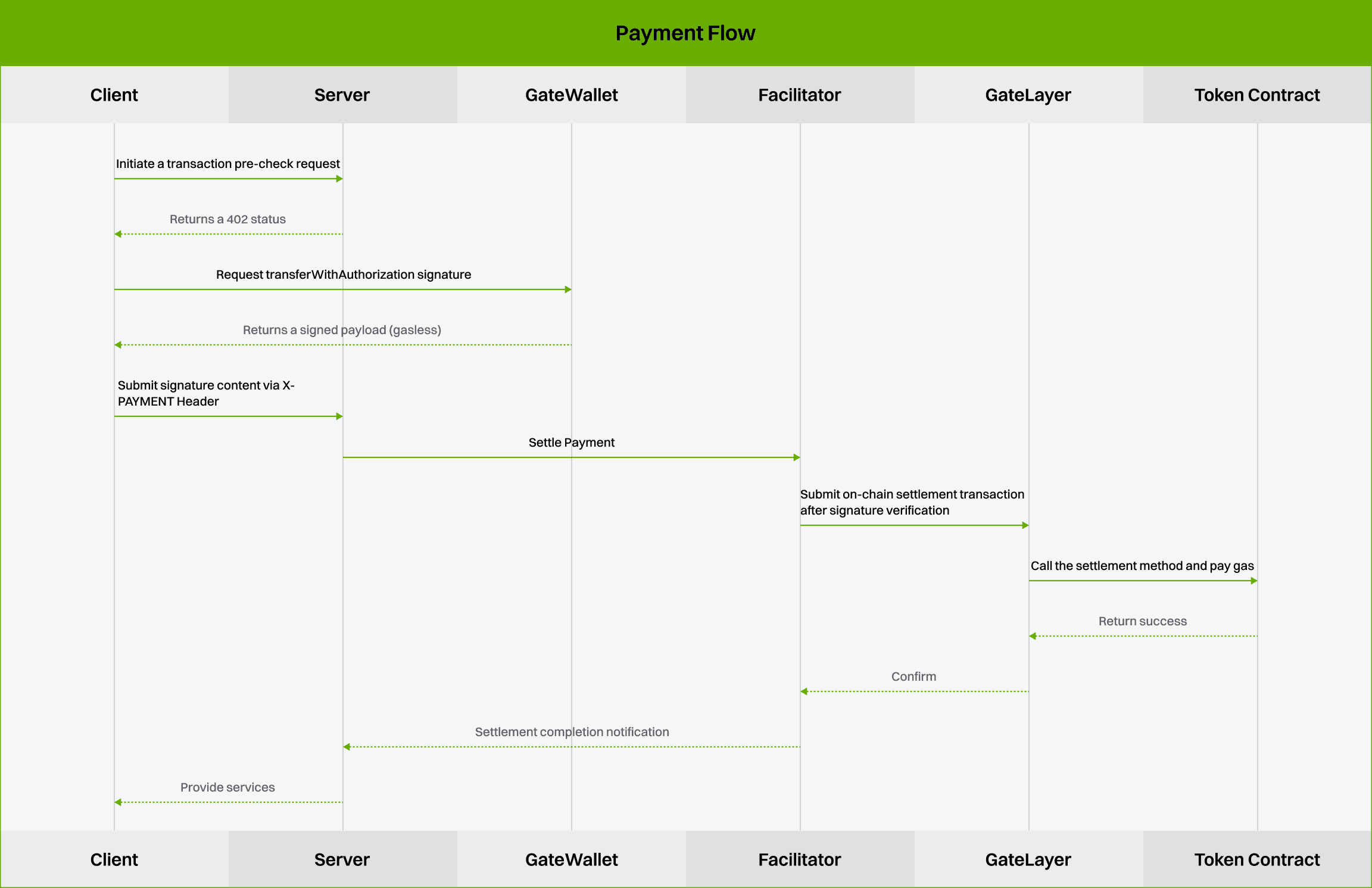
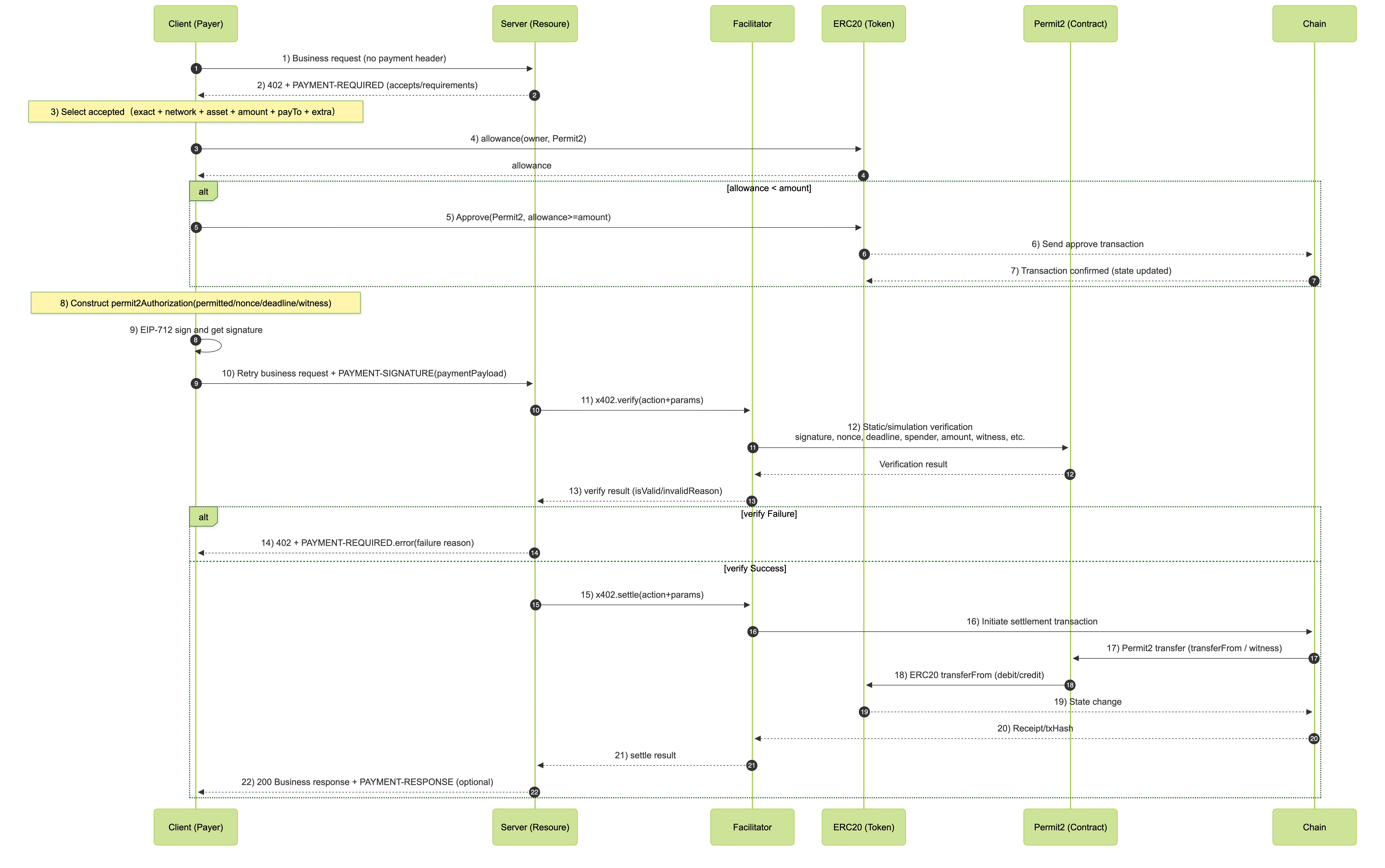
Payment Flow
- EIP-3009 Token
- Generic ERC-20 tokens (Permit2)
API Access and Usage
Before using the API, you need to create a project and generate an API key in the developer portal.
Rate Limiting
To ensure service stability, we enforce rate limits on API requests.
- Rate Limits:
- Per Access Key: Each API endpoint is limited to 1 request per second per Access Key.
- Global Limit: Each specific API action is limited to 50 requests per second globally.
- Response: If these limits are exceeded, the API will return the following error code.
| Error code | Constant Name | Description |
|---|---|---|
| 10131 | RATE_LIMIT_GLOBAL_EXCEEDED | Global rate limit exceeded |
| 10132 | RATE_LIMIT_PER_AK_EXCEEDED | Per access key rate limit exceeded |
| 10133 | RATE_LIMIT_PER_ACTION_EXCEEDED | Per action rate limit exceeded |
Supported networks and crypto
Supported networks:
| Network | Schemes | CAIP-2 Identifier | Identifier | v1 Support | v2 Support | ChainIndex |
|---|---|---|---|---|---|---|
| Gate Layer | exact, upto, batch-settlement | eip155:10088 | gatelayer | Supported | Supported | 10088 |
| Ethereum | exact, upto, batch-settlement | eip155:1 | eth | Supported | Supported | 1 |
| Base | exact, upto, batch-settlement | eip155:8453 | base | Supported | Supported | 8453 |
| Polygon | exact, upto, batch-settlement | eip155:137 | Polygon | Supported | Supported | 137 |
| Arbitrum One | exact, upto , batch-settlement | eip155:42161 | Arbitrum One | Supported | Supported | 42161 |
| BSC | exact, upto, batch-settlement | eip155:56 | bsc | Supported | Supported | 56 |
| Solana | exact | solana:5eykt4UsFv8P8NJdTREpY1vzqKqZKvdp | solana | Supported | Supported | 101 |
Supported token:
- EIP-3009 Tokens
| Network | Token | Contract address |
|---|---|---|
| Gatelayer | GUSD | 0xECE3F96198a5E6B9b2278edbEa8d548F66050d1c |
| Gatelayer | USDC.e | 0x8a2B28364102Bea189D99A475C494330Ef2bDD0B |
| Ethereum | USDC | 0xA0b86991c6218b36c1d19D4a2e9Eb0cE3606eB48 |
| Base | USDC | 0x833589fCD6eDb6E08f4c7C32D4f71b54bdA02913 |
| Arbitrum One | USDC | 0xaf88d065e77c8cc2239327c5edb3a432268e5831 |
| Polygon | USDC | 0x3c499c542cEF5E3811e1192ce70d8cC03d5c3359 |
- Non-EIP-3009 (Permit2)
| Network | Token | Contract address |
|---|---|---|
| Ethereum | USDT | 0xdac17f958d2ee523a2206206994597c13d831ec7 |
| BSC | USDC | 0x8ac76a51cc950d9822d68b83fe1ad97b32cd580d |
| BSC | USDT | 0x55d398326f99059ff775485246999027b3197955 |
| BSC | USD1 | 0x8d0d000ee44948fc98c9b98a4fa4921476f08b0d |
| Base | USDT | 0xfde4c96c8593536e31f229ea8f37b2ada2699bb2 |
- Non-EVM Chain Tokens
| Network | Token | Contract address |
|---|---|---|
| Solana | USDC | EPjFWdd5AufqSSqeM2qN1xzybapC8G4wEGGkZwyTDt1v |
| Solana | USDT | Es9vMFrzaCERmJfrF4H2FYD4KCoNkY11McCe8BenwNYB |
Testnet Facilitator
The x402 testnet facilitator is available for testing and development:
| Network | Scheme | Identifier | x402 API | ChainIndex |
|---|---|---|---|---|
| Gate Layer Testnet | exact | gatelayer_testnet | Supported | 10087 |
| Solana Devnet | exact | solana-devnet | Supported | 103 |
Payment Schemes
Choose between exact, upto, and batch-settlement payment schemes in x402.
Payment schemes define the payment semantics for a resource: exact is for fixed-price requests where the buyer authorizes the advertised amount, upto is for single-request usage-based billing where the buyer authorizes a maximum and the seller charges actual usage, and batch-settlement is for high-volume or repeated micropayments where per-request authorizations are accumulated against a reusable channel.
Exact
Fixed-price x402 payments where the buyer authorizes exactly the advertised amount.
The exact scheme is a fixed-price payment scheme. The seller advertises one amount, the buyer signs for that exact amount, and the facilitator settles that payment for the request. Use exact when the final charge is known before the response is generated, such as a fixed-price API call, file download, or gated page.
Upto
Usage-based x402 payments where the buyer authorizes a maximum and the seller charges actual usage.
The upto scheme lets a seller advertise a maximum price for one request, then settle for the actual amount used. The buyer signs once for the maximum, and the server chooses a final amount that is less than or equal to that maximum. Use upto for one-request usage metering, such as LLM token generation, bandwidth, compute time, or dynamic data queries.
Settlement Override Formats
amount can be expressed as:
| Format | Example | Meaning |
|---|---|---|
| Raw atomic units | "50000" | Settle exactly 50,000 token base units |
| Percentage | "50%" | Settle 50% of the route maximum |
| Dollar price | "$0.05" | Convert a dollar-denominated route price to base units |
Setting the amount to "0" means no charge for that request.
EVM Implementation
upto uses Permit2 because the settled amount is not known when the buyer signs. The facilitator advertises a facilitatorAddress in the payment requirements, and the client binds the authorization to that facilitator.
Batch Settlement
High-throughput EVM payments with escrow, off-chain vouchers, and batched onchain redemption.
The batch-settlement scheme is for high-throughput payments where many requests are authorized individually and redeemed later in batches. The EVM implementation uses stateless unidirectional payment channels: a buyer deposits funds into onchain escrow once, then signs off-chain cumulative vouchers for each request. The seller verifies vouchers quickly and redeems them onchain later in batches. Use batch-settlement for repeated paid API calls, usage-metered endpoints, and other workloads where many small payments would be too expensive or slow to settle one-by-one.
How It Works
- Deposit: the client opens or tops up a channel by depositing ERC-20 funds into escrow. Deposits use EIP-3009 or Permit2 and are submitted by the facilitator.
- Voucher: each paid request includes a signed cumulative voucher for the channel's total claimable amount.
- Verify: the server verifies the voucher and serves the response without waiting for an onchain transfer.
- Claim: the server's channel manager periodically claims the latest vouchers from many channels in one transaction.
- Settle: claimed funds are swept to the receiver in a separate settle transaction.
- Refund: idle channels can be cooperatively refunded after outstanding vouchers are claimed.
The route price is still a per-request maximum. For dynamic pricing, the server can charge less than that maximum with settlement overrides.
Server Setup
Register the scheme with a resource server, protect routes with scheme: "batch-settlement", configure server-side channel storage, and run a channel manager to claim, settle, and refund channels.
import { HTTPFacilitatorClient } from '@x402/core/server';
import { BatchSettlementEvmScheme } from '@x402/evm/batch-settlement/server';
import { FileChannelStorage } from '@x402/evm/batch-settlement/server/file-storage';
import { paymentMiddleware, setSettlementOverrides, x402ResourceServer } from '@x402/express';

const network = 'eip155:10088' as const;
const facilitatorClient = new HTTPFacilitatorClient({ url: process.env.FACILITATOR_URL! });

const batchScheme = new BatchSettlementEvmScheme(receiverAddress, {
  receiverAuthorizerSigner,
  withdrawDelay: 86400,
  storage: new FileChannelStorage({ directory: './channels' }),
});

const resourceServer = new x402ResourceServer(facilitatorClient).register(network, batchScheme);

const channelManager = batchScheme.createChannelManager(facilitatorClient, network);
channelManager.start({
  claimIntervalSecs: 60,
  settleIntervalSecs: 300,
  refundIntervalSecs: 3600,
  maxClaimsPerBatch: 100,
});

app.use(
  paymentMiddleware(
    {
      'GET /weather': {
        accepts: {
          scheme: 'batch-settlement',
          price: '$0.01',
          network,
          payTo: receiverAddress,
        },
        description: 'Weather data',
        mimeType: 'application/json',
      },
    },
    resourceServer,
  ),
);

app.get('/weather', (req, res) => {
  setSettlementOverrides(res, { amount: '50%' });
  res.json({ report: { weather: 'sunny', temperature: 70 } });
});
Server Storage
Server storage keeps the latest voucher and channel session state that the channel manager uses to claim, settle, and refund later. In-memory storage is useful for local demos, but production servers should configure durable storage so outstanding vouchers survive restarts. Use file storage for single-process deployments. For serverless or multi-instance deployments, use Redis/Valkey storage so channel updates are shared atomically across processes. See the Next.js batch-settlement Redis example for a full withX402 setup with RedisChannelStorage and cron-based claim/settle routes.
Client Setup
Register BatchSettlementEvmScheme for eip155:*. The client SDK handles deposits, voucher signing, channel recovery, and corrective 402 resync.
import { x402Client, wrapFetchWithPayment } from '@x402/fetch';
import { toClientEvmSigner } from '@x402/evm';
import { BatchSettlementEvmScheme } from '@x402/evm/batch-settlement/client';
import { createPublicClient, http } from 'viem';
import { baseSepolia } from 'viem/chains';
import { privateKeyToAccount } from 'viem/accounts';

const account = privateKeyToAccount(process.env.EVM_PRIVATE_KEY as `0x${string}`);
const publicClient = createPublicClient({ chain: GateLayer, transport: http() });
const signer = toClientEvmSigner(account, publicClient);

const batchScheme = new BatchSettlementEvmScheme(signer, {
  depositPolicy: { depositMultiplier: 5 },
});

const client = new x402Client();
client.register('eip155:*', batchScheme);

const fetchWithPayment = wrapFetchWithPayment(fetch, client);
const response = await fetchWithPayment('https://api.example.com/weather');
Deposit Policy
The deposit policy controls how much the client deposits when a channel needs funding or top-up.
| Field | Description |
|---|---|
depositMultiplier / DepositMultiplier | Deposits amount x multiplier for the advertised per-request maximum. The default is 5; the minimum is 3. |
depositStrategy / DepositStrategy | Optional callback for caps, dynamic deposits, or opting out of automatic top-up. |
const maxDeposit = 1_000_000n;

const batchScheme = new BatchSettlementEvmScheme(signer, {
  depositPolicy: { depositMultiplier: 5 },
  depositStrategy: ({ depositAmount }) => {
    const amount = BigInt(depositAmount);
    return amount > maxDeposit ? maxDeposit : undefined;
  },
});
Voucher Signer Delegation
By default, vouchers are signed by the payer key. For higher-throughput clients, especially smart wallets using EIP-1271, delegate voucher signing to a dedicated EOA. The delegated address is committed into the channel as payerAuthorizer, which lets the facilitator verify vouchers with ECDSA recovery instead of an onchain smart-wallet signature check.
const voucherSigner = toClientEvmSigner(
  privateKeyToAccount(process.env.EVM_VOUCHER_SIGNER_PRIVATE_KEY as `0x${string}`),
);

const batchScheme = new BatchSettlementEvmScheme(signer, {
  voucherSigner,
});
Client Persistence and Refunds
Client channel state is stored in memory by default. Persistent client storage is optional because the SDK can recover channel state through corrective 402 responses and onchain state on the next paid request. Long-lived clients can still persist state to avoid that recovery round trip after restarts.
import { FileClientChannelStorage } from '@x402/evm/batch-settlement/client/file-storage';

const batchScheme = new BatchSettlementEvmScheme(signer, {
  storage: new FileClientChannelStorage({ directory: './channels' }),
});

await batchScheme.refund('https://api.example.com/weather');
await batchScheme.refund('https://api.example.com/weather', { amount: '1000000' });
Receiver Authorizer
Every channel commits to a receiverAuthorizer, which signs claim and refund authorizations.
| Strategy | When to use it |
|---|---|
Self-managed receiverAuthorizerSigner | Recommended for production. Channels survive facilitator changes because any facilitator can relay your signed claims and refunds. |
| Facilitator-delegated authorizer | Simpler to run. If you switch facilitators, claim and refund old channels before opening new ones. |
Settlement Policy
Choose claim, settle, and refund intervals based on throughput and gas cost:
- Claim often enough that outstanding vouchers are claimed before a payer's timed withdrawal can finalize after
withdrawDelay. - Settle less often when gas savings matter more than cash-flow latency.
- Refund idle channels to return unclaimed balance to payers.
Set withdrawDelay greater than your claim cadence plus an operational safety margin.
Examples
- TypeScript client
- TypeScript server
- Next.js server + Redis storage
- Go client
- Go server
Specs
batch-settlementspecbatch-settlementEVM spec
Start
Developer Platform
To help you quickly access and manage API services, this guide introduces the main features and usage methods of the Developer Management Platform, including registration/login, API key creation, account security settings, and key management.
- Developer Portal: https://web3.gate.com/api-manage
- Detailed tutorial: https://gateweb3.gitbook.io/gate_dex_api/exploredexapi/en/api-access-and-usage/developer-platform
API List
Introduction
The x402 payment protocol is an HTTP-based payment protocol that enables developers running resource servers to accept payments from users using a variety of payment methods. The x402 Facilitator APIs enable you to facilitate payments using the x402 payment protocol by exposing three APIs.
Get basic information
Request address https://openapi.gateweb3.cc/api/v1/x402
{ "action": "x402.supported", "params": {} }
Request parameters
No
Response parameters
| Parameter | Type | Description |
|---|---|---|
| kinds | Array | Array of supported payment types |
| >x402Version | Integer | Version of x402, e.g., 1 |
| >scheme | String | Settlement scheme, e.g., exact (one-time payment of a fixed amount) |
| >network | String | Network identifier, e.g., gatelayer |
| extensions | Array[String] | Extension fields |
Request example
curl -X POST https://openapi.gateweb3.cc/api/v1/x402 \
  -H "Content-Type: application/json" \
  -H "X-API-Key: your-api-key" \
  -H "X-Signature: your-signature" \
  -H "X-Timestamp: $(date +%s%3N)" \
  -H "X-Request-Id: ${REQUEST_ID}" \
  -d '{
  "action": "x402.supported",
  "params": {
   }
 }'
Request example (Permit2)
curl -X POST https://openapi.gateweb3.cc/api/v1/x402 \
  -H "Content-Type: application/json" \
  -H "X-API-Key: your-api-key" \
  -H "X-Signature: your-signature" \
  -H "X-Timestamp: $(date +%s%3N)" \
  -H "X-Request-Id: ${REQUEST_ID}" \
  -d '{
    "action": "x402.supported",
    "params": {
      "extensions": ["permit2"]
    }
  }'
Response example
{
  "code": 0,
  "msg": "",
  "data": {
    "kinds": [
      {
        "x402Version": 2,
        "scheme": "exact",
        "network": "gatelayer_testnet"
      }
    ],
    "extensions": []
  },
  "timestamp": 1769592841
}
Submit transaction
Request address https://openapi.gateweb3.cc/api/v1/x402
{ "action": "x402.settle", "params": {} }
Request parameters
| Parameter | Type | Required | Description |
|---|---|---|---|
| x402Version | Integer | Yes | x402 protocol version, e.g., 2 |
| paymentPayload | Object | Yes | The x402 payment payload carried by the client along with the request for the protected resource |
| >x402Version | Integer | Yes | x402 protocol version, e.g., 2 |
| >accepted | Object | Yes | The settlement scheme to be used |
| >>scheme | String | No | Settlement scheme, e.g., exact (one-time payment of a fixed amount). If empty, returns paymentRequirements. |
| >>network | String | No | Network identifier, e.g., gatelayer. If empty, returns paymentRequirements. |
| >payload | Object | Yes | Payment signature and authorization data object |
| >>signature | String | Yes | Cryptographic signature |
| >>authorization | Object | No | EIP-3009 authorization info (fill when using EIP-3009) |
| >>>from | String | Yes | Payer address |
| >>>to | String | Yes | Payee address |
| >>>value | String | Yes | Transfer amount |
| >>>validAfter | String | Yes | Effective time (Unix timestamp) |
| >>>validBefore | String | Yes | Expiration time (Unix timestamp) |
| >>>nonce | String | Yes | Random number (Nonce) to prevent replay attacks |
| >>permit2Authorization | Object | No | Permit2 authorization info (fill when assetTransferMethod=permit2) |
| >>>from | String | Yes | Payer address |
| >>>spender | String | Yes | Permit2 proxy spender (eth/base: 0x3765Cf99CEE0075aFd6Cafe103b1c78Ed75aC9Bf, bsc: 0x701cCFfcdE34b92B16599Ac865AA1395A1a1F38c) |
| >>>permitted | Object | Yes | Permit2 token/amount |
| >>>>token | String | Yes | Token contract address |
| >>>>amount | String | Yes | Permitted amount |
| >>>nonce | String | Yes | Permit2 nonce |
| >>>deadline | String | Yes | Permit2 deadline (Unix) |
| >>>witness | Object | Yes | Witness information |
| >>>>to | String | Yes | witness.to (recipient address) |
| >>>>validAfter | String | Yes | witness.validAfter (Unix) |
| paymentRequirements | Object | Yes | Payment details required to access the resource (Amount/Network/Asset/Payee, etc.) |
| >scheme | String | Yes | Settlement scheme, e.g., exact (one-time payment of a fixed amount) |
| >network | String | Yes | Network identifier, e.g., gatelayer |
| >asset | String | Yes | Asset identifier / Contract address (Network dependent) |
| >amount | String | Yes | Transfer amount (token's smallest unit / atomic unit). E.g. for 6-decimal tokens, 10000 = 0.01 |
| >payTo | String | Yes | Payee / Recipient |
| >maxTimeoutSeconds | Integer | No | Maximum waiting seconds after the authorization becomes valid |
| >extra.assetTransferMethod | String | No | Asset transfer method: permit2 means use Permit2 (must be paired with payload.permit2Authorization) |
Response parameters
| Parameter | Type | Description |
|---|---|---|
| success | Boolean | Whether the call was successful |
| payer | String | Payer |
| transaction | String | Transaction Hash |
| errorReason | String | Reason for failure |
| network | String | Network |
Request example
curl -X POST https://openapi.gateweb3.cc/api/v1/x402 \
  -H "Content-Type: application/json" \
  -H "X-API-Key: your-api-key" \
  -H "X-Signature: your-signature" \
  -H "X-Timestamp: $(date +%s%3N)" \
  -H "X-Request-Id: ${REQUEST_ID}" \
  -d '{
    "action": "x402.settle",
    "params": {
        "x402Version": 2,
        "paymentPayload": {
            "x402Version": 2,
            "accepted": {
                "scheme": "exact",
                "network": "gatelayer_testnet"
            },
            "payload": {
                "signature": "0x437830ba823c6d680c43fa820af1acdef16da9db3c58e031031c3a8051e5f1c6379d6cae031a1c5601e81aa866768ec35d6b794351dc7c1b598a74ff2fda93c21b",
                "authorization": {
                    "from": "0x9F7236e6B4AAd75603C0DdB28dE5f12DeDe6E9D4",
                    "to": "0xe734bb6268fcd90756e36c30d6a5fce30569eb6f",
                    "value": "1111",
                    "validAfter": "0",
                    "validBefore": "1768978707",
                    "nonce": "0x50f24a1d09b9aa10dd5b8365d871f729303362f7f48269ab431d2f4f90895355"
                }
            }
        },
        "paymentRequirements": {
            "scheme": "exact",
            "network": "gatelayer_testnet",
            "asset": "0x9be8Df37C788B244cFc28E46654aD5Ec28a880AF",
            "amount": "1111",
            "payTo": "0xe734bb6268fcd90756e36c30d6a5fce30569eb6f",
            "maxTimeoutSeconds": 3600
        }
    }
 }'
Request example (Permit2)
curl -X POST https://openapi.gateweb3.cc/api/v1/x402 \
  -H "Content-Type: application/json" \
  -H "X-API-Key: your-api-key" \
  -H "X-Signature: your-signature" \
  -H "X-Timestamp: $(date +%s%3N)" \
  -H "X-Request-Id: ${REQUEST_ID}" \
  -d '{
    "action": "x402.settle",
    "params": {
      "x402Version": 2,
      "paymentPayload": {
        "x402Version": 2,
        "accepted": {
          "scheme": "exact",
          "network": "eth"
        },
        "payload": {
          "permit2Authorization": {
            "deadline": "1774345660",
            "from": "0x9F7236e6B4AAd75603C0DdB28dE5f12DeDe6E9D4",
            "nonce": "1",
            "permitted": {
              "amount": "100",
              "token": "0xdAC17F958D2ee523a2206206994597C13D831ec7"
            },
            "spender": "0x3765Cf99CEE0075aFd6Cafe103b1c78Ed75aC9Bf",
            "witness": {
              "to": "0x9F7236e6B4AAd75603C0DdB28dE5f12DeDe6E9D4",
              "validAfter": "0"
            }
          },
          "signature": "0xedffa6e319f7ff02b438bb9ce9439ea4fb7a91f965aa3289ea5405c7deb2d80126c32970e8ec45c422ef498cd6c71edf65a00f18cbe919c4ce587e33f5f6ff031c"
        }
      },
      "paymentRequirements": {
        "scheme": "exact",
        "network": "eth",
        "asset": "0xdAC17F958D2ee523a2206206994597C13D831ec7",
        "amount": "100",
        "payTo": "0x9F7236e6B4AAd75603C0DdB28dE5f12DeDe6E9D4",
        "extra": {
          "assetTransferMethod": "permit2"
        }
      }
    }
  }'
Amount unit note: The
amount/valuein all examples are in the token's smallest unit (not human-readable decimals). For a 6-decimal token:1111 = 0.001111,100 = 0.0001.
Response example
Success:
{
  "code": 0,
  "msg": "",
  "data": {
    "success": true,
    "payer": "0x9F7236e6B4AAd75603C0DdB28dE5f12DeDe6E9D4",
    "transaction": "0xc36d65c0de132e47852830e27325552a669e2ab6604facc5bddd674ee3eb594c",
    "network": "gatelayer_testnet"
  },
  "timestamp": 1769593302
}
Fail:
{
  "code": 200,
  "msg": "",
  "data": {
    "success": false,
    "errorReason": "transaction 0x38a864a30dadea91b66ce3bff870a0ead1be4fcc8a647fc58c2f12d1516afca5 reverted on-chain at block 11943682",
    "transaction": "",
    "network": ""
  },
  "timestamp": 1768997786
}
Verify the transaction
Request address https://openapi.gateweb3.cc/api/v1/x402
{ "action": "x402.verify", "params": {} }
Request parameters
| Parameter | Type | Required | Description |
|---|---|---|---|
| x402Version | Integer | Yes | x402 protocol version, e.g., 2 |
| paymentPayload | Object | Yes | The x402 payment payload carried by the client along with the protected request |
| >x402Version | Integer | Yes | x402 protocol version, e.g., 2 |
| >accepted | Object | No | The settlement scheme to be used |
| >>scheme | String | No | Settlement scheme, e.g., exact (fixed amount one-time payment) |
| >>network | String | No | Network identifier, e.g., gatelayer |
| >payload | Object | Yes | Payment signature and authorization data object |
| >>signature | String | Yes | Cryptographic signature |
| >>authorization | Object | No | EIP-3009 authorization info (fill when using EIP-3009) |
| >>>from | String | Yes | Payer address |
| >>>to | String | Yes | Payee address |
| >>>value | String | Yes | Transfer amount |
| >>>validAfter | String | Yes | Effective time (Unix timestamp) |
| >>>validBefore | String | Yes | Expiration time (Unix timestamp) |
| >>>nonce | String | Yes | Random number (Nonce) to prevent replay attacks |
| >>permit2Authorization | Object | No | Permit2 authorization info (fill when assetTransferMethod=permit2) |
| >>>from | String | Yes | Payer address |
| >>>spender | String | Yes | Permit2 proxy spender (eth/base: 0x3765Cf99CEE0075aFd6Cafe103b1c78Ed75aC9Bf, bsc: 0x701cCFfcdE34b92B16599Ac865AA1395A1a1F38c) |
| >>>permitted | Object | Yes | Permit2 token/amount |
| >>>>token | String | Yes | Token contract address |
| >>>>amount | String | Yes | Permitted amount |
| >>>nonce | String | Yes | Permit2 nonce |
| >>>deadline | String | Yes | Permit2 deadline (Unix) |
| >>>witness | Object | Yes | Witness information |
| >>>>to | String | Yes | witness.to (recipient address) |
| >>>>validAfter | String | Yes | witness.validAfter (Unix) |
| paymentRequirements | Object | Yes | Payment details required to access the resource (Amount/Network/Asset/Payee, etc.) |
| >scheme | String | Yes | Settlement scheme, e.g., exact (fixed amount one-time payment) |
| >network | String | Yes | Network identifier, e.g., gatelayer |
| >asset | String | Yes | Asset identifier / Contract address (Network dependent) |
| >amount | String | Yes | Transfer amount (token's smallest unit / atomic unit). E.g. for 6-decimal tokens, 10000 = 0.01 |
| >payTo | String | Yes | Payee / Recipient |
| >maxTimeoutSeconds | Integer | No | Maximum waiting seconds after the authorization becomes valid |
| >extra.assetTransferMethod | String | No | Asset transfer method: permit2 means use Permit2 (must be paired with payload.permit2Authorization) |
Response parameters
| Parameter | Type | Description |
|---|---|---|
| isValid | boolean | Whether it is valid |
| invalidReason | string | Reason for invalidity |
| payer | string | In valid cases, the payer address |
Request example
curl -X POST https://openapi.gateweb3.cc/api/v1/x402 \
  -H "Content-Type: application/json" \
  -H "X-API-Key: your-api-key" \
  -H "X-Signature: your-signature" \
  -H "X-Timestamp: $(date +%s%3N)" \
  -H "X-Request-Id: ${REQUEST_ID}" \
  -d '{
    "action": "x402.verify",
    "params": {
        "x402Version": 2,
        "paymentPayload": {
            "x402Version": 2,
            "accepted": {
                "scheme": "exact",
                "network": "gatelayer_testnet"
            },
            "payload": {
                "signature": "0x437830ba823c6d680c43fa820af1acdef16da9db3c58e031031c3a8051e5f1c6379d6cae031a1c5601e81aa866768ec35d6b794351dc7c1b598a74ff2fda93c21b",
                "authorization": {
                    "from": "0x9F7236e6B4AAd75603C0DdB28dE5f12DeDe6E9D4",
                    "to": "0xe734bb6268fcd90756e36c30d6a5fce30569eb6f",
                    "value": "1111",
                    "validAfter": "0",
                    "validBefore": "1768978707",
                    "nonce": "0x50f24a1d09b9aa10dd5b8365d871f729303362f7f48269ab431d2f4f90895355"
                }
            }
        },
        "paymentRequirements": {
            "scheme": "exact",
            "network": "gatelayer_testnet",
            "asset": "0x9be8Df37C788B244cFc28E46654aD5Ec28a880AF",
            "amount": "1111",
            "payTo": "0xe734bb6268fcd90756e36c30d6a5fce30569eb6f",
            "maxTimeoutSeconds": 3600
        }
    }
 }'
Request example (Permit2)
curl -X POST https://openapi.gateweb3.cc/api/v1/x402 \
  -H "Content-Type: application/json" \
  -H "X-API-Key: your-api-key" \
  -H "X-Signature: your-signature" \
  -H "X-Timestamp: $(date +%s%3N)" \
  -H "X-Request-Id: ${REQUEST_ID}" \
  -d '{
    "action": "x402.verify",
    "params": {
      "x402Version": 2,
      "paymentPayload": {
        "x402Version": 2,
        "accepted": {
          "scheme": "exact",
          "network": "eth"
        },
        "payload": {
          "permit2Authorization": {
            "deadline": "1774345660",
            "from": "0x9F7236e6B4AAd75603C0DdB28dE5f12DeDe6E9D4",
            "nonce": "1",
            "permitted": {
              "amount": "100",
              "token": "0xdAC17F958D2ee523a2206206994597C13D831ec7"
            },
            "spender": "0x3765Cf99CEE0075aFd6Cafe103b1c78Ed75aC9Bf",
            "witness": {
              "to": "0x9F7236e6B4AAd75603C0DdB28dE5f12DeDe6E9D4",
              "validAfter": "0"
            }
          },
          "signature": "0xedffa6e319f7ff02b438bb9ce9439ea4fb7a91f965aa3289ea5405c7deb2d80126c32970e8ec45c422ef498cd6c71edf65a00f18cbe919c4ce587e33f5f6ff031c"
        }
      },
      "paymentRequirements": {
        "scheme": "exact",
        "network": "eth",
        "asset": "0xdAC17F958D2ee523a2206206994597C13D831ec7",
        "amount": "100",
        "payTo": "0x9F7236e6B4AAd75603C0DdB28dE5f12DeDe6E9D4",
        "extra": {
          "assetTransferMethod": "permit2"
        }
      }
    }
  }'
Request example (Solana)
curl -X POST https://openapi.gateweb3.cc/api/v1/x402 \
  -H "Content-Type: application/json" \
  -H "X-API-Key: your-api-key" \
  -H "X-Signature: your-signature" \
  -H "X-Timestamp: $(date +%s%3N)" \
  -H "X-Request-Id: ${REQUEST_ID}" \
  -d '{
    "action": "x402.verify",
    "params": {
      "x402Version": 2,
      "paymentPayload": {
        "x402Version": 2,
        "accepted": {
          "scheme": "exact",
          "network": "solana-devnet"
        },
        "payload": {
          "transaction": "AgAAAAAAAAAAAAAAAAAAAAAAAAAAAAAAAAAAAAAAAAAAAAAAAAAAAAAAAAAAAAAAAAAAAAAAAAAAAAAAAAAAAAA7q9i+x44wnyXybrVzEunIEa8xcnsuTbVONuAvCYKQHieUB+9eP86tpYNHHw29o/+kzfqZLjkCposQmxdi868LgAIBBAgbw1xMgvndUnCY2H5iyPEOv0OWixAUZadhCZ/UR+gbHYEIqcQndRHFtNnl1ViE+P5Pgf29VbWHZi2Fy8Reop9oQz+vpyWh8YsyIXfaca60bbSpTKssypuO545X8tpdIPUKZRwNNVTihwOaySpu5eXDE5IqDgjhUO+cn5ia054J9pp2+sEqFk7q5ZZDSEmDXbkEx1mSwO1SgyvULFbIYc0UAwZGb+UhFzL/7K26csOb57yM5bvF9xJrLEObOkAAAAAG3fbh12Whk9nL4UbO63msHLSF7V9bN5E6jPWFfv8AqQVKU1qZKSEGTSTocWDaOHx8NbXdvJK7geQfqEBBBUSNqQws4gKC61QaRl7IvU/2yJxT7e/jzicQper6CVLZknIEBQAFAiBOAAAFAAkDAQAAAAAAAAAGBAIEAwEKDOgDAAAAAAAABgcAIDg5ZDRiZDFhZTJiNmVmMDE5ZjhmYmViODNiZmZlNWRhAA=="
        }
      },
      "paymentRequirements": {
        "scheme": "exact",
        "network": "solana-devnet",
        "asset": "BPy1fp1Hb1v6Rr41ayPs8ttRUrjjNqkApudTiinNucg3",
        "amount": "1000",
        "payTo": "9iuLQj4Xr7HAduaym6jR5TR9gMsTNTWGjo6aGPZnvvPx",
        "maxTimeoutSeconds": 0,
        "extra": {
          "feePayer": "2sNna5GLGutRVAH4ZoUgWxtz31gXKsRTFs6mWmvRmAg4"
        }
      }
    }
  }'
Amount unit note: The
amount/valuein all examples are in the token's smallest unit (not human-readable decimals). For a 6-decimal token:1111 = 0.001111,100 = 0.0001,1000 = 0.001.
Response example
Success:
{
  "code": 0,
  "msg": "",
  "data": {
    "isValid": true,
    "payer": "0x9F7236e6B4AAd75603C0DdB28dE5f12DeDe6E9D4"
  },
  "timestamp": 1769593299
}
Fail:
{
  "code": 200,
  "msg": "",
  "data": {
    "isValid": false,
    "invalidReason": "nonce already used"
  },
  "timestamp": 1768997783
}
Error Codes
| Error Code | Constant Name | Description |
|---|---|---|
| 0 | CodeSuccess | Success |
| 51001 | CodeInvalidPayload | Payment payload invalid or missing |
| 51002 | CodeInvalidRequirements | Payment requirements invalid or missing |
| 51003 | CodeMissingPayloadField | Missing payload field |
| 51101 | CodeUnsupportedNetwork | Unsupported network |
| 51201 | CodeTokenNotFound | Token not found |
| 51301 | CodeInvalidExactPayload | Invalid exact payload format |
| 51302 | CodeMissingSignature | Missing signature |
| 51401 | CodeRecipientMismatch | Recipient address mismatch |
| 51402 | CodeInvalidAuthValue | Invalid auth value format |
| 51403 | CodeInvalidRequiredAmount | Invalid required amount format |
| 51404 | CodeInsufficientAmount | Insufficient amount |
| 51502 | CodeNonceAlreadyUsed | Nonce already used |
| 51602 | CodeInsufficientBalance | Insufficient balance |
| 51701 | CodeInvalidSignatureFormat | Invalid signature format |
| 51702 | CodeInvalidSignatureLength | Invalid signature length (should be 65 bytes) |
| 51704 | CodeInvalidSignature | Invalid signature (signature verification failed) |
| 51901 | CodeInvalidValueFormat | Invalid value format |
| 51902 | CodeInvalidValidAfterFormat | Invalid validAfter format |
| 51903 | CodeInvalidValidBeforeFormat | Invalid validBefore format |
| 51904 | CodeInvalidNonceFormat | Invalid nonce format |
| 51905 | CodeInvalidNonceLength | Invalid nonce length (should be 32 bytes) |
Permit2 / Solana Supplementary Notes (SDK Error Reasons)
In the current repository, new Permit2 / Solana errors are primarily returned as
invalidReason/errorReasonstrings at the SDK layer, rather than new51xxxnumeric error codes.
Permit2 (EVM) Common Error Reasons (Examples)
| Field | Example Value | Description |
|---|---|---|
| invalidReason | invalid_exact_evm_authorization_value | Permit2 authorization fields (e.g. nonce/deadline/amount) have invalid format |
| invalidReason | invalid_exact_evm_nonce_already_used | Nonce already used (replay) |
| invalidReason | invalid_exact_evm_signature | Permit2 signature verification failed |
| invalidReason | invalid_exact_evm_recipient_mismatch | witness.to does not match payTo |
| errorReason | invalid_exact_evm_verification_failed | Pre-settle verify did not pass |
Solana (SVM) Common Error Reasons (Examples)
| Field | Example Value | Description |
|---|---|---|
| invalidReason | invalid_exact_solana_payload_missing_fee_payer | Missing feePayer |
| invalidReason | invalid_exact_solana_fee_payer_not_managed_by_facilitator | feePayer is not a facilitator-managed address |
| invalidReason | invalid_exact_solana_payload_transaction_could_not_be_decoded | Transaction body cannot be decoded / invalid format |
| invalidReason | invalid_exact_solana_payload_transaction_instructions_length | Instruction count does not match expected |
| invalidReason | invalid_exact_solana_payload_transaction_instructions_compute_price_instruction_too_high | Compute unit price exceeds limit |
| invalidReason | invalid_exact_solana_payload_recipient_mismatch | Recipient address mismatch |
| invalidReason | invalid_exact_solana_payload_amount_insufficient | Transaction amount insufficient |
| errorReason | invalid_exact_solana_transaction_failed | On-chain settlement transaction failed |
| errorReason | invalid_exact_solana_transaction_confirmation_failed | Transaction confirmation failed (may include blockhash expiry and other on-chain reasons) |
Guidelines (SDK & Demo)
This section supplements the minimum runnable setup for the Go / TypeScript SDK and lists the ready-to-run Permit2 (EVM) and Solana (SVM) demos in the repository, making it easy to run an end-to-end flow directly.
Reference SDK Capabilities
The x402 official reference SDK is designed around the core goal of being "extensible and configurable."
EVM Support (@x402/evm)
@x402/evm supports any EVM-compatible chain you configure, and covers ERC-20 payments through two transfer methods:
- EIP-3009 (Transfer With Authorization): For tokens that natively implement EIP-3009 (e.g. USDC). The buyer signs an authorization offline; the facilitator executes the transfer on-chain on their behalf, so the buyer does not need to do an on-chain approve first.
- Permit2: For any ERC-20. The buyer signs a
PermitWitnessTransferFrommessage, and the facilitator executes the transfer.
This means coverage for:
- Any Ethereum L1 / L2
- Any EVM-compatible chain with a valid chain ID
- Any ERC-20 (via Permit2) or EIP-3009-compatible token (USDC, etc.)
Permit2 Authorization (Approval)
Permit2 requires the buyer to have a valid prior authorization to the Permit2 contract. x402 supports two Gas Sponsorship extensions to handle this step automatically:
- EIP-2612 Gas Sponsoring: For tokens that implement EIP-2612 (permit), the facilitator can pay Gas to complete the authorization to Permit2 based on an offline-signed permit message, so the buyer needs no Gas.
If Gas Sponsorship extensions are not enabled, the buyer must manually complete one "payment token → Permit2 contract" approve before their first payment.
Both EIP-3009 and Permit2 (including Gas Sponsorship extensions) are supported in the official TypeScript (@x402/evm) / Go SDK.
Solana Support (@x402/svm)
@x402/svm supports any Solana cluster, covering:
- SPL Token Program tokens
- Token2022 Program tokens
Demo (Runnable Directly from Repository)
TypeScript (Recommended Starting Point)
- Permit2 (BSC, exact) all-in-one server+client: examples/typescript/clients/permit2_exact_bsc_flow/
# Install dependencies in the repository root
pnpm i

# Start (launches a local server and runs the client in the same process)
pnpm -C examples/typescript/clients/permit2_exact_bsc_flow start
Common environment variables (replace with your actual wallet/test chain values):
EVM_PRIVATE_KEY: Required — payer's EVM private key
GATE_WEB3_API_KEY / GATE_WEB3_API_SECRET: Required — facilitator (Gate Web3 OpenAPI) authentication
EVM_NETWORK: Optional — defaults to
bscPERMIT_NONCE: Optional; if omitted, the demo auto-generates one to avoid
nonce already usedSolana (devnet, exact) all-in-one server+client: examples/typescript/clients/svm_exact_solana_flow/
pnpm i
pnpm -C examples/typescript/clients/svm_exact_solana_flow start
Common environment variables:
- SVM_CLIENT_PRIVATE_KEY: Required — Solana private key (base58)
- SVM_PAYEE_ADDRESS: Required — recipient address (base58)
- SVM_NETWORK: Optional — defaults to
solana-devnet(recommended to use this value directly) - SVM_ASSET_MINT: Optional — defaults to devnet asset mint
- SVM_FEE_PAYER: Required (workaround). When the current facilitator's
/supporteddoes not return feePayer/signers, you must provide this explicitly.- Testnet (
solana-devnet) example:2sNna5GLGutRVAH4ZoUgWxtz31gXKsRTFs6mWmvRmAg4 - Mainnet (
solana) example:ejyfDKF3YAgtVUcpEUdvNmhuSF2dcTdUMPRCfAmBL1V
- Testnet (
- GATE_WEB3_API_KEY / GATE_WEB3_API_SECRET: Required — facilitator authentication
Solana Network Name Compatibility (V1 / V2)
To avoid network not supported errors caused by inconsistent network names, use the values in the table below:
| Scenario | Recommended Value |
|---|---|
| Inside the SDK (Go / TypeScript demo) | solana-devnet (testnet), solana (mainnet) |
Direct Gate OpenAPI calls (x402.verify / x402.settle) | solana-devnet (testnet), solana (mainnet) |
Note: Different naming conventions (e.g. CAIP-2 or other aliases) may appear in older versions. If you encounter compatibility issues, prioritize the values in the table above.
Go
- Permit2 (BSC, exact) all-in-one demo:
examples/go/permit2_exact_bsc_flow/ - Solana (devnet, exact) all-in-one demo:
examples/go/svm_exact_solana_flow/
cd examples/go/svm_exact_solana_flow
go run .
Payment case
This guide will show you how to create a Go client that can initiate paid requests to x402-protected resources.
TypeScript Integration (Payment)
For the minimum runnable TypeScript example, refer directly to:
- Permit2 (BSC): examples/typescript/clients/permit2_exact_bsc_flow/server_client.ts
- Solana (SVM): examples/typescript/clients/svm_exact_solana_flow/server_client.ts
Run commands:
pnpm -C examples/typescript/clients/permit2_exact_bsc_flow start
pnpm -C examples/typescript/clients/svm_exact_solana_flow start
Prerequisites
Before starting, ensure you have:
- A crypto wallet with USDC (any EVM-compatible wallet)
- Go 1.24+ installed
- A service requiring payment via x402
1. Install Dependencies
Add the x402 Go module to your project:
go get github.com/gatechain/x402/go
2. Create a Payment-enabled HTTP Client
The SDK automatically handles payment creation and signing using the chain's DOMAIN_SEPARATOR. For gatelayer_testnet, it uses the correct DOMAIN_SEPARATOR from the token contract to ensure valid signatures.
Here is a complete runnable example:
package main

import (
  "context"
  "encoding/json"
  "fmt"
  "net/http"
  "os"
  "time"

  x402 "github.com/gatechain/x402/go"
  x402http "github.com/gatechain/x402/go/http"
  evm "github.com/gatechain/x402/go/mechanisms/evm/exact/client"
  evmsigners "github.com/gatechain/x402/go/signers/evm"
)

func main() {
  // Get configuration from environment
  privateKey := os.Getenv("EVM_PRIVATE_KEY")
  if privateKey == "" {
    fmt.Println("❌ EVM_PRIVATE_KEY environment variable is required")
    os.Exit(1)
  }

  url := os.Getenv("SERVER_URL")
  if url == "" {
    url = "http://localhost:4021/weather"
  }

  fmt.Printf("🚀 Making paid request to: %s\n\n", url)

  // Create EVM signer from private key
  evmSigner, err := evmsigners.NewClientSignerFromPrivateKey(privateKey)
  if err != nil {
    fmt.Printf("❌ Failed to create signer: %v\n", err)
    os.Exit(1)
  }

  fmt.Printf("✅ Signer created: %s\n\n", evmSigner.Address())

  // Create x402 client and register EVM scheme
  // The SDK automatically uses the chain's DOMAIN_SEPARATOR for signing
  // For gatelayer_testnet, it uses the correct DOMAIN_SEPARATOR from the chain
  x402Client := x402.Newx402Client().
    Register("gatelayer_testnet", evm.NewExactEvmScheme(evmSigner))

  // Wrap HTTP client with payment handling
  // PaymentRoundTripper automatically handles 402 responses and retries with payment
  httpClient := x402http.WrapHTTPClientWithPayment(
    http.DefaultClient,
    x402http.Newx402HTTPClient(x402Client),
  )

  // Make request - payment is handled automatically
  // The PaymentRoundTripper will:
  // 1. Make the initial request
  // 2. If it receives a 402 Payment Required response, it will:
  //    - Parse the payment requirements from the response
  //    - Create a payment payload using the chain's DOMAIN_SEPARATOR
  //    - Sign the payment payload
  //    - Retry the request with the payment header
  ctx, cancel := context.WithTimeout(context.Background(), 30*time.Second)
  defer cancel()

  req, err := http.NewRequestWithContext(ctx, "GET", url, nil)
  if err != nil {
    fmt.Printf("❌ Failed to create request: %v\n", err)
    os.Exit(1)
  }

  resp, err := httpClient.Do(req)
  if err != nil {
    fmt.Printf("❌ Request failed: %v\n", err)
    os.Exit(1)
  }
  defer resp.Body.Close()

  // Check response status
  if resp.StatusCode != http.StatusOK {
    body, _ := json.Marshal(map[string]interface{}{
      "status":  resp.StatusCode,
      "message": "Request failed",
    })
    fmt.Printf("❌ HTTP %d: %s\n", resp.StatusCode, string(body))
    os.Exit(1)
  }

  // Read response
  var data map[string]interface{}
  if err := json.NewDecoder(resp.Body).Decode(&data); err != nil {
    fmt.Printf("❌ Failed to decode response: %v\n", err)
    os.Exit(1)
  }

  fmt.Println("✅ Response received:")
  prettyJSON, _ := json.MarshalIndent(data, "  ", "  ")
  fmt.Printf("%s\n\n", string(prettyJSON))

  // Check payment response header
  paymentHeader := resp.Header.Get("PAYMENT-RESPONSE")
  if paymentHeader == "" {
    paymentHeader = resp.Header.Get("X-PAYMENT-RESPONSE")
  }

  if paymentHeader != "" {
    fmt.Println("💰 Payment settled successfully!")
    fmt.Printf("   Payment header: %s\n", paymentHeader)
  }
}
3. How It Works
The wrapped HTTP client automatically:
- Detects 402 Responses: When the server responds with
402 Payment Required, the client extracts payment requirements from thePAYMENT-REQUIREDheader. - Creates Payment Payload: The client creates a signed payment payload using the registered payment scheme.
- Retries with Payment: The client automatically retries the request with the
PAYMENT-SIGNATUREheader containing the payment payload (v2 standard naming). - Handles Settlement: After successful payment verification, the server returns the resource and includes settlement confirmation in the
PAYMENT-RESPONSEheader.
Note: The x402 v2 standard headers are
PAYMENT-REQUIRED/PAYMENT-SIGNATURE/PAYMENT-RESPONSE. AnyX-PAYMENT-*occurrences in code are typically used only for legacy compatibility reading.
Configuration
Environment Variables
For Gate Web3 OpenAPI authentication, set the following environment variables:
# Required
export GATE_WEB3_API_KEY="your-api-key"
export GATE_WEB3_API_SECRET="your-api-secret"

# Optional
export GATE_WEB3_PASSPHRASE="your-passphrase"
export GATE_WEB3_REAL_IP="your-real-ip"  # Defaults to 127.0.0.1
Facilitator Configuration
The facilitator client defaults to using Gate Web3 OpenAPI:
facilitatorClient := x402http.NewHTTPFacilitatorClient(&x402http.FacilitatorConfig{
  URL: "https://openapi.gateweb3.cc/api/v1/x402",
  // Optional: Custom HTTP client
  HTTPClient: &http.Client{
    Timeout: 30 * time.Second,
  },
  // Optional: Custom auth provider
  AuthProvider: &MyAuthProvider{},
})
Supporting the Upto Scheme
To consume APIs that bill on a usage-based model with the upto scheme, register UptoEvmScheme on your client in addition to the exact scheme you have already registered. upto is fully transparent to the buyer — the SDK automatically handles the off-chain signature for the "maximum authorization amount", and you are only charged the amount finally settled by the server (which may be less than the authorized ceiling).
import { x402Client } from '@x402/fetch';
import { ExactEvmScheme } from '@x402/evm/exact/client';
import { UptoEvmScheme } from '@x402/evm/upto/client';
import { privateKeyToAccount } from 'viem/accounts';

const signer = privateKeyToAccount(process.env.EVM_PRIVATE_KEY as `0x${string}`);

const client = new x402Client();
client.register('eip155:*', new ExactEvmScheme(signer));
client.register('eip155:*', new UptoEvmScheme(signer));
Note: At this stage
uptois offered on EVM networks only (Gate Layer, Ethereum, Base, Polygon, Arbitrum One, BSC), with SDK coverage across TypeScript, Go, and Python. After both schemes are registered on the client, scheme selection is automatic — the SDK reads theschemefield from the server's 402 response and routes the payment accordingly, so your application code stays unchanged.
Collection case
This guide will show you how to integrate x402 into your Go server to accept payments for APIs or services.
TypeScript Integration (Receiving Payment)
The TypeScript receiving side (resource service) can also directly reuse the server portion of the all-in-one demo:
- Permit2 (BSC) server reference: examples/typescript/clients/permit2_exact_bsc_flow/server_client.ts
- Solana (SVM) server reference: examples/typescript/clients/svm_exact_solana_flow/server_client.ts
If you need separate deployment, you can extract the Express server portion from the above files; the client portion is only for local integration testing.
Prerequisites
Before starting, ensure you have:
- A crypto wallet for receiving funds (any EVM-compatible wallet)
- Go 1.24+ installed
- An existing HTTP server (Gin, standard library, etc.)
Payment Schemes: Exact vs Upto
Two schemes are available in x402 for determining how a request is priced and charged:
exact(default): A single advertised price that the client pays in full. It is the most portable option — every supported network (both EVM and SVM) and every SDK (TypeScript, Go, Python) handles it. Reach forexactwhenever the price is known before the request is served: flat-rate API endpoints, paid downloads, and gated content all fit this model.upto: The client signs for a ceiling, but the server decides how much of that ceiling to actually capture. This unlocks usage-based pricing where the final number depends on work done at request time — think LLM tokens generated, CPU seconds consumed, bytes transferred, or rows returned from a parametric query. Coverage is currently limited to EVM networks, across the TypeScript, Go, and Python SDKs.
The server example in Collection Case: 3. Create a Payment-Protected Server below is built around exact. Switching that example to upto comes down to two changes:
- In the route configuration, set
Scheme: "upto". ThePricefield is now interpreted as the upper bound that the client agrees to authorize. - Inside your handler, invoke
SetSettlementOverridesto declare the amount you actually want to charge for this particular request.
A complete runnable version is shown below, using the Gin framework on Gate Layer:
package main

import (
    "fmt"
    "math/rand"
    "net/http"
    "time"

    x402 "github.com/x402-foundation/x402/go"
    x402http "github.com/x402-foundation/x402/go/http"
    ginmw "github.com/x402-foundation/x402/go/http/gin"
    uptoevm "github.com/x402-foundation/x402/go/mechanisms/evm/upto/server"
    "github.com/gin-gonic/gin"
)

func main() {
    payTo := "0xYourAddress"
    network := x402.Network("eip155:10088") // Gate Layer

    r := gin.Default()

    facilitatorClient := x402http.NewHTTPFacilitatorClient(&x402http.FacilitatorConfig{
        URL: "https://x402.org/facilitator",
    })

    maxPrice := "$0.10" // Maximum the client authorizes

    r.Use(ginmw.X402Payment(ginmw.Config{
        Routes: x402http.RoutesConfig{
            "GET /api/generate": {
                Accepts: x402http.PaymentOptions{
                    {
                        Scheme:  "upto",
                        Price:   maxPrice,
                        Network: network,
                        PayTo:   payTo,
                    },
                },
                Description: "AI text generation - billed by token usage",
                MimeType:    "application/json",
            },
        },
        Facilitator: facilitatorClient,
        Schemes: []ginmw.SchemeConfig{
            {Network: network, Server: uptoevm.NewUptoEvmScheme()},
        },
        Timeout: 30 * time.Second,
    }))

    r.GET("/api/generate", func(c *gin.Context) {
        maxAmountAtomic := 100000 // 10 cents in 6-decimal USDC atomic units
        actualUsage := rand.Intn(maxAmountAtomic + 1)

        // Settle only the actual usage
        ginmw.SetSettlementOverrides(c, &x402.SettlementOverrides{
            Amount: fmt.Sprintf("%d", actualUsage),
        })

        c.JSON(http.StatusOK, gin.H{
            "result": "Here is your generated text...",
            "usage": gin.H{
                "authorizedMaxAtomic": fmt.Sprintf("%d", maxAmountAtomic),
                "actualChargedAtomic": fmt.Sprintf("%d", actualUsage),
            },
        })
    })

    r.Run(":4021")
}
Three formats are accepted by the Amount field of SetSettlementOverrides:
- Atomic units (raw): A numeric string such as
"1000"charges exactly 1,000 of the token's smallest units. For a 6-decimal token like USDC,"1000"works out to$0.001. - Percentage of the ceiling: A value such as
"50%"deducts half of the authorized maximum. Two decimal places of precision are allowed (for example"33.33%"). - USD-denominated price: A value such as
"$0.05"is converted to atomic units using the network's stablecoin decimals. This conversion only applies when the route'sPricewas likewise specified with the$prefix — for example"$0.10".
Whatever format is used, the final charge is constrained to be ≤ the authorized ceiling. Setting Amount to "0" skips on-chain settlement entirely; the buyer is not charged for that request.
Note:
uptois currently available on EVM networks only, with SDK support in TypeScript, Go, and Python. Solana payments currently supportexactexclusively.
1. Install Dependencies
Add the x402 Go module to your project:
go get github.com/gatechain/x402/go
2. Set Environment Variables
Set the required environment variables before running the server:
# Required: Wallet address to receive payments
export PAYEE_ADDRESS="0x1234567890123456789012345678901234567890"

# Recommended: pair NETWORK and FACILITATOR_URL to avoid mixing testnet/mainnet
export NETWORK="gatelayer_testnet"
export FACILITATOR_URL="https://openapi-test.gateweb3.cc/api/v1/x402"

# Required for Gate Web3 OpenAPI authentication
export GATE_WEB3_API_KEY="your-api-key"
export GATE_WEB3_API_SECRET="your-api-secret"

# Optional
export GATE_WEB3_PASSPHRASE="your-passphrase"
export GATE_WEB3_REAL_IP="your-real-ip"
Environment matching recommendations:
- Test environment:
NETWORK=gatelayer_testnet+FACILITATOR_URL=https://openapi-test.gateweb3.cc/api/v1/x402 - Production environment: Choose mainnet based on business needs (e.g.
eth/base/bsc) +FACILITATOR_URL=https://openapi.gateweb3.cc/api/v1/x402
3. Create a Payment-Protected Server
Here is a complete runnable example using the Gin framework:
package main

import (
  "fmt"
  "net/http"
  "os"
  "time"

  "github.com/gin-gonic/gin"
  x402 "github.com/gatechain/x402/go"
  x402http "github.com/gatechain/x402/go/http"
  ginmw "github.com/gatechain/x402/go/http/gin"
  evm "github.com/gatechain/x402/go/mechanisms/evm/exact/server"
)

func main() {
  // Get receiving wallet address from environment variable
  payTo := os.Getenv("PAYEE_ADDRESS")
  if payTo == "" {
    fmt.Println("❌ PAYEE_ADDRESS environment variable is required")
    fmt.Println("   Example: export PAYEE_ADDRESS=0x1234567890123456789012345678901234567890")
    os.Exit(1)
  }

  network := x402.Network(getenv("NETWORK", "gatelayer_testnet"))
  facilitatorURL := getenv("FACILITATOR_URL", "https://openapi-test.gateweb3.cc/api/v1/x402")

  fmt.Printf("🚀 Starting x402 payment server...\n")
  fmt.Printf("   Payee address: %s\n", payTo)
  fmt.Printf("   Network: %s\n", network)
  fmt.Printf("   Facilitator: %s\n\n", facilitatorURL)

  r := gin.Default()

  // Create facilitator client
  // Keep NETWORK and FACILITATOR_URL in the same environment tier
  // (testnet with openapi-test, mainnet with openapi).
  // The client will automatically use Gate Web3 authentication if environment variables are set:
  // - GATE_WEB3_API_KEY
  // - GATE_WEB3_API_SECRET
  // - GATE_WEB3_PASSPHRASE (optional)
  // - GATE_WEB3_REAL_IP (optional)
  facilitatorClient := x402http.NewHTTPFacilitatorClient(&x402http.FacilitatorConfig{
    URL: facilitatorURL,
  })

  // Apply x402 payment middleware
  r.Use(ginmw.X402Payment(ginmw.Config{
    Routes: x402http.RoutesConfig{
      "GET /weather": {
        Accepts: x402http.PaymentOptions{
          {
            Scheme:  "exact",
            PayTo:   payTo,
            Price:   "$0.001", // Price in USD - automatically converts to USDC on the network
            Network: network,
          },
        },
        Description: "Get weather data for a city",
        MimeType:    "application/json",
      },
    },
    Facilitator: facilitatorClient,
    Schemes: []ginmw.SchemeConfig{
      {Network: network, Server: evm.NewExactEvmScheme()},
    },
    SyncFacilitatorOnStart: true,
    Timeout:                30 * time.Second,
  }))

  // Protected endpoint
  r.GET("/weather", func(c *gin.Context) {
    city := c.DefaultQuery("city", "San Francisco")
    c.JSON(http.StatusOK, gin.H{
      "city":        city,
      "weather":     "sunny",
      "temperature": 70,
      "timestamp":   time.Now().Format(time.RFC3339),
    })
  })

  // Health check endpoint (no payment required)
  r.GET("/health", func(c *gin.Context) {
    c.JSON(http.StatusOK, gin.H{
      "status":  "ok",
      "version": "1.0.0",
    })
  })

  fmt.Printf("   Server listening on http://localhost:4021\n")
  if err := r.Run(":4021"); err != nil {
    fmt.Printf("❌ Error starting server: %v\n", err)
    os.Exit(1)
  }
}

func getenv(key, fallback string) string {
  if v := os.Getenv(key); v != "" {
    return v
  }
  return fallback
}
4. Test Your Integration
Start your server:
go run main.go
Make a request without payment:
curl http://localhost:4021/weather
The server will respond with 402 Payment Required, including payment instructions in the PAYMENT-REQUIRED header. Use a compatible client to complete payment and retry the request. After successful payment verification, the server will return your API response.