概览
什么是 x402 API
x402 是一种全新的开放支付协议,支持通过 HTTP 直接进行即时、自动的稳定币支付。 即时访问,零摩擦。 x402 利用 HTTP 402 状态码,实现了网络上的直接稳定币支付。它用一种简单的协议取代了复杂的身份验证和付费墙:向网络支付,获取资源。无论是用于 API 变现还是数字内容,x402 都允许客户端——从用户到自动化机器人——无需账户即可即时交易。
为什么要使用 x402?
- 零摩擦访问: 消除对账户、注册或复杂 OAuth 流程的需求。访问权限通过支付即时授予,创造无状态的“随付随用”体验。
- 专为 AI 代理构建: 专为机器对机器 (M2M) 的商业模式优化,使自主代理能够处理高频微交易和按请求付费的 API 调用。
- 即时全球结算: 利用互联网原生稳定币协议消除金融中介,确保卖方实现低成本和即时结算。
- 直接变现: 赋能开发者和内容创作者进行精细化变现(例如:按 API 调用次数或按文章付费),同时允许买家通过编程方式访问资源,无需订阅。
工作原理
x402 使用简单的请求-响应流程,实现了基于 HTTP 的程序化支付。当客户端请求付费资源时,服务器响应支付要求,客户端提交支付,服务器随即交付资源。
主要特性
- Gas 补贴: 在 Gate Layer 上实现免 Gas 代币(白名单代币)的转账和支付。
- 多网络支持: 支持 Gate Layer,Ethereum,Base, Polygon,BSC, Arbitrum One,Solana 网络。
- 多代币支付选项: 通过 Permit2 即可支付任意 ERC-20 代币;若使用 USDC 等 EIP-3009 代币,还能获得最佳的无摩擦体验。
- SDKs: TypeScript & Go SDK,生产就绪的客户端和服务器端库。
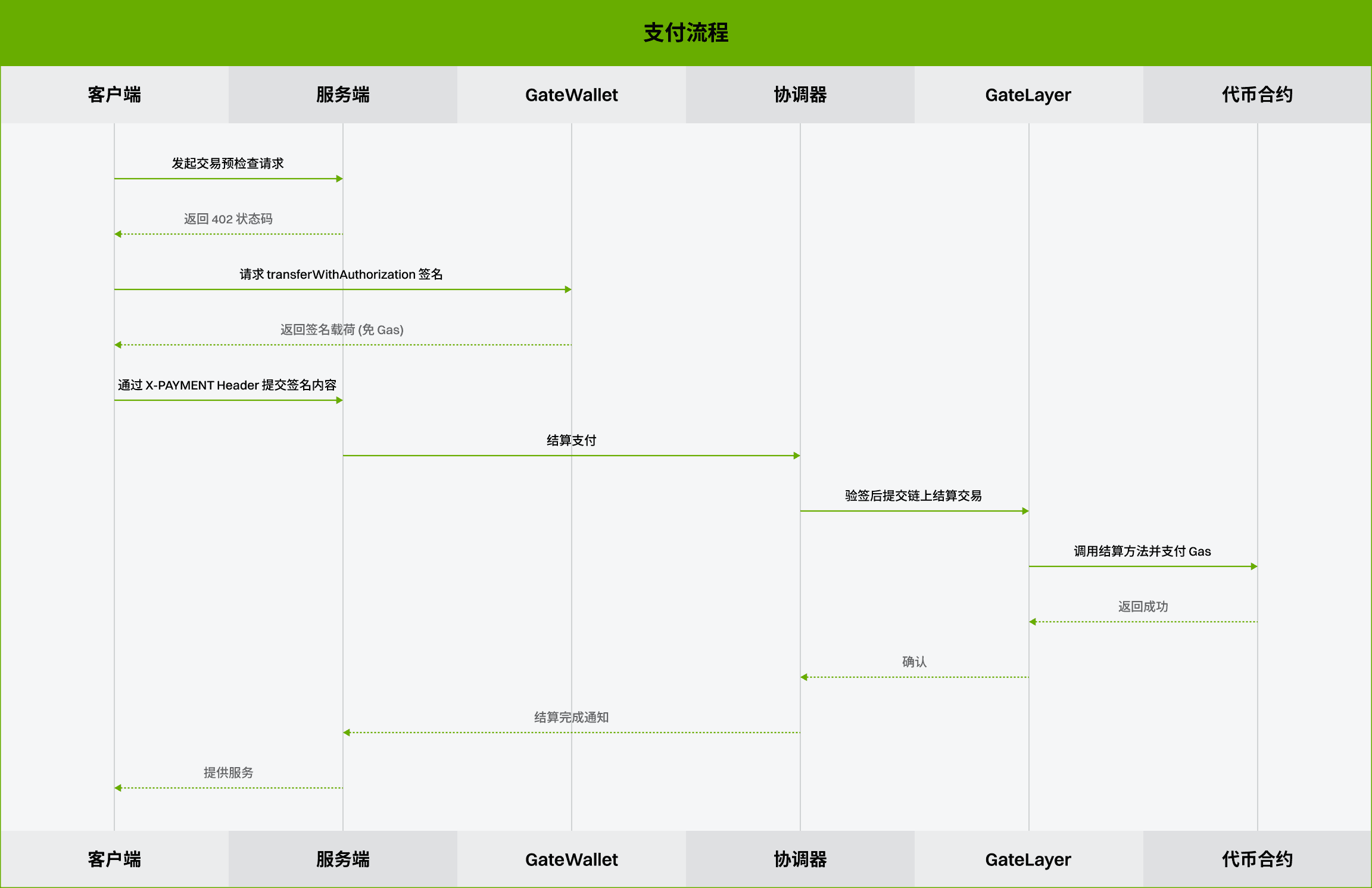
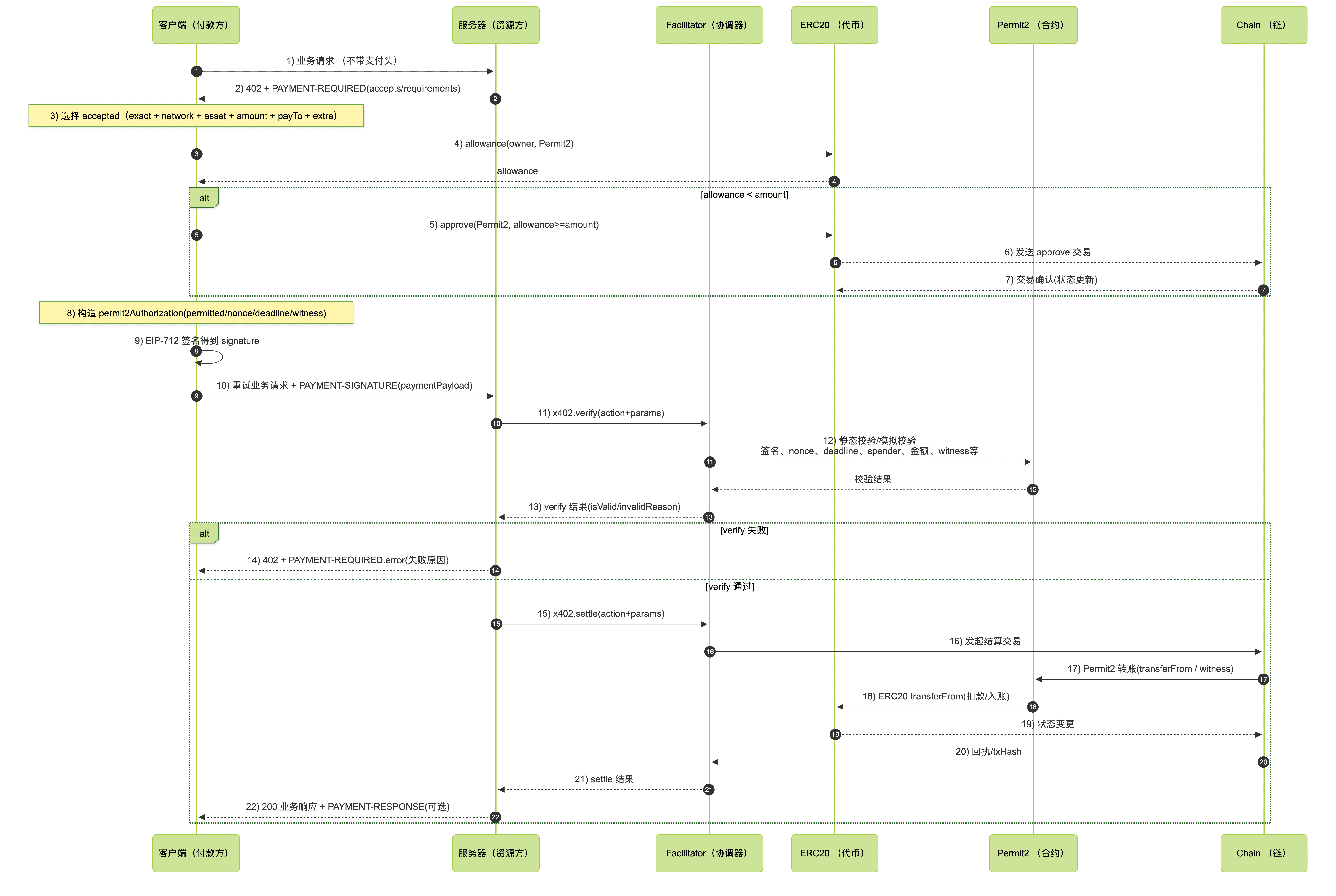
支付流程
- EIP-3009代币:
- ERC-20 代币(非3009)(Permit2):
API 访问和用法
在使用 API 之前,您需要在开发者门户中创建一个项目并生成 API 密钥 (API Key)。
限流
为了确保服务的稳定性,API 对请求频率实施了限制。
限制规则:
- 用户级限制: 每个 Access Key 对单个 API 接口的调用频率限制为每秒 1 次请求 。
- 全局限制: 单个 API 接口 (Action) 全网每秒最多允许发送 50 个请求 (50 QPS)。
响应处理:
如果请求超出限制,API 将返回下方错误码。
| 错误码 | 常量名 | 描述 |
|---|---|---|
| 10131 | RATE_LIMIT_GLOBAL_EXCEEDED | 全局限流超限 |
| 10132 | RATE_LIMIT_PER_AK_EXCEEDED | 每 Access Key 限流超限 |
| 10133 | RATE_LIMIT_PER_ACTION_EXCEEDED | 每 Action 限流超限 |
支持的网络和币种
支持的网络:
| Network | Schemes | CAIP-2 Identifier | Identifier | v1 Support | v2 Support | ChainIndex |
|---|---|---|---|---|---|---|
| Gate Layer | exact, upto, batch-settlement | eip155:10088 | gatelayer | Supported | Supported | 10088 |
| Ethereum | exact, upto , batch-settlement | eip155:1 | eth | Supported | Supported | 1 |
| Base | exact, upto , batch-settlement | eip155:8453 | base | Supported | Supported | 8453 |
| Polygon | exact, upto , batch-settlement | eip155:137 | Polygon | Supported | Supported | 137 |
| Arbitrum One | exact, upto, batch-settlement | eip155:42161 | Arbitrum One | Supported | Supported | 42161 |
| BSC | exact, upto , batch-settlement | eip155:56 | bsc | Supported | Supported | 56 |
| Solana | exact | solana:5eykt4UsFv8P8NJdTREpY1vzqKqZKvdp | solana | Supported | Supported | 101 |
支持的代币:
- EIP-3009 代币
| Network | Token | Contract address |
|---|---|---|
| Gatelayer | GUSD | 0xECE3F96198a5E6B9b2278edbEa8d548F66050d1c |
| Gatelayer | usdc.e | 0x8a2B28364102Bea189D99A475C494330Ef2bDD0B |
| Ethereum | USDC | 0xA0b86991c6218b36c1d19D4a2e9Eb0cE3606eB48 |
| Base | USDC | 0x833589fCD6eDb6E08f4c7C32D4f71b54bdA02913 |
| Arbitrum One | USDC | 0xaf88d065e77c8cc2239327c5edb3a432268e5831 |
| Polygon | USDC | 0x3c499c542cEF5E3811e1192ce70d8cC03d5c3359 |
- 非 EIP-3009 (Permit2)代币
| Network | Token | Contract address |
|---|---|---|
| Ethereum | USDT | 0xdac17f958d2ee523a2206206994597c13d831ec7 |
| BSC | USDC | 0x8ac76a51cc950d9822d68b83fe1ad97b32cd580d |
| BSC | USDT | 0x55d398326f99059ff775485246999027b3197955 |
| BSC | USD1 | 0x8d0d000ee44948fc98c9b98a4fa4921476f08b0d |
| Base | USDT | 0xfde4c96c8593536e31f229ea8f37b2ada2699bb2 |
- 非 EVM 链代币
| Network | Token | Contract address |
|---|---|---|
| Solana | USDC | EPjFWdd5AufqSSqeM2qN1xzybapC8G4wEGGkZwyTDt1v |
| Solana | USDT | Es9vMFrzaCERmJfrF4H2FYD4KCoNkY11McCe8BenwNYB |
测试网 Facilitator
x402测试网 Facilitator 可用于测试和开发:
| Network | Scheme | Identifier | x402 API | ChainIndex |
|---|---|---|---|---|
| Gate Layer Testnet | exact | gatelayer_testnet | Supported | 10087 |
| Solana Devnet | exact | solana-devnet | Supported | 103 |
支付方案(Payment Schemes)
在 x402 中选择 exact、upto 和 batch-settlement 支付方案。
支付方案为某个资源定义了支付语义:exact 用于固定价格的请求,买方授权所公布的金额;upto 用于单次请求的按用量计费,买方授权一个上限金额,卖方按实际用量收费;而 batch-settlement 用于大量或重复的小额支付,每次请求的授权会累积到一个可复用的通道上。
Exact(固定价格)
固定价格的 x402 支付,买方授权的金额与所公布的金额完全一致。
exact 方案是一种固定价格的支付方案。卖方公布一个金额,买方对该确切金额进行签名,facilitator 为该请求结算这笔支付。当最终费用在生成响应之前就已确定时(例如固定价格的 API 调用、文件下载或受限页面),应使用 exact。
Upto(按用量计费)
基于用量的 x402 支付,买方授权一个上限金额,卖方按实际用量收费。
upto 方案允许卖方为一次请求公布一个最高价格,然后按实际使用的金额进行结算。买方对该上限金额签名一次,服务器再选择一个小于或等于该上限的最终金额。对于单次请求的用量计量(例如 LLM 令牌生成、带宽、计算时间或动态数据查询),应使用 upto。
结算覆盖格式(Settlement Override Formats)
amount 可以表示为以下几种形式:
| 格式 | 示例 | 释义 |
|---|---|---|
| Raw atomic units | "50000" | 精确结算 50,000 个代币基础单位 |
| Percentage | "50%" | 结算路由最高金额的 50% |
| Dollar price | "$0.05" | 将以美元计价的路由价格转换为基础单位 |
将 amount 设置为 "0" 表示该请求不收取费用。
EVM 实现
upto 使用 Permit2,因为买方签名时尚不知道结算金额。facilitator 会在支付要求中公布一个 facilitatorAddress,客户端会将授权绑定到该 facilitator。
Batch Settlement(批量结算)
高吞吐量的 EVM 支付,采用托管(escrow)、链下凭证(voucher)以及链上批量兑付。
batch-settlement 方案适用于高吞吐量的支付场景:大量请求被单独授权,随后以批量方式兑付。EVM 实现使用无状态的单向支付通道:买方一次性将资金存入链上托管,然后为每个请求签发链下累积凭证。卖方可快速验证凭证,稍后再以批量方式在链上兑付。对于重复的付费 API 调用、按用量计费的端点,以及其他逐笔结算过于昂贵或过于缓慢的大量小额支付场景,应使用 batch-settlement。
工作原理
- Deposit(存入):客户端通过将 ERC-20 资金存入托管来开通或充值一个通道。存入操作使用 EIP-3009 或 Permit2,并由 facilitator 提交。
- Voucher(凭证):每个付费请求都包含一张已签名的累积凭证,对应该通道当前可领取的总金额。
- Verify(验证):服务器验证凭证并返回响应,无需等待链上转账。
- Claim(领取):服务器的通道管理器会定期在一笔交易中领取来自多个通道的最新凭证。
- Settle(结算):领取到的资金会在一笔单独的结算交易中划转给收款方。
- Refund(退款):在未结凭证被领取后,闲置的通道可以协作式地进行退款。
路由的 price 仍然是每次请求的最高金额。对于动态定价,服务器可以通过结算覆盖(settlement override)收取低于该最高金额的费用。
服务端配置
在资源服务器上注册该方案,使用 scheme: "batch-settlement" 保护路由,配置服务端通道存储,并运行一个通道管理器来对通道执行领取、结算和退款。
import { HTTPFacilitatorClient } from '@x402/core/server';
import { BatchSettlementEvmScheme } from '@x402/evm/batch-settlement/server';
import { FileChannelStorage } from '@x402/evm/batch-settlement/server/file-storage';
import { paymentMiddleware, setSettlementOverrides, x402ResourceServer } from '@x402/express';

const network = 'eip155:10088' as const;
const facilitatorClient = new HTTPFacilitatorClient({ url: process.env.FACILITATOR_URL! });

const batchScheme = new BatchSettlementEvmScheme(receiverAddress, {
  receiverAuthorizerSigner,
  withdrawDelay: 86400,
  storage: new FileChannelStorage({ directory: './channels' }),
});

const resourceServer = new x402ResourceServer(facilitatorClient).register(network, batchScheme);

const channelManager = batchScheme.createChannelManager(facilitatorClient, network);
channelManager.start({
  claimIntervalSecs: 60,
  settleIntervalSecs: 300,
  refundIntervalSecs: 3600,
  maxClaimsPerBatch: 100,
});

app.use(
  paymentMiddleware(
    {
      'GET /weather': {
        accepts: {
          scheme: 'batch-settlement',
          price: '$0.01',
          network,
          payTo: receiverAddress,
        },
        description: 'Weather data',
        mimeType: 'application/json',
      },
    },
    resourceServer,
  ),
);

app.get('/weather', (req, res) => {
  setSettlementOverrides(res, { amount: '50%' });
  res.json({ report: { weather: 'sunny', temperature: 70 } });
});
服务端存储
服务端存储保存最新的凭证以及通道会话状态,通道管理器随后会用它们来执行领取、结算和退款。内存存储适用于本地演示,但生产环境的服务器应配置持久化存储,以便未结凭证能在重启后保留。单进程部署可使用文件存储;对于无服务器(serverless)或多实例部署,应使用 Redis/Valkey 存储,以便通道更新能在多个进程间原子地共享。请参阅 Next.js batch-settlement Redis 示例,了解使用 withX402 和 RedisChannelStorage、以及基于 cron 的领取/结算路由的完整 withX402 配置。
客户端配置
注册 BatchSettlementEvmScheme,用于 eip155:*。客户端 SDK 会处理存入、凭证签名、通道恢复以及纠正性的 402 重新同步。
import { x402Client, wrapFetchWithPayment } from '@x402/fetch';
import { toClientEvmSigner } from '@x402/evm';
import { BatchSettlementEvmScheme } from '@x402/evm/batch-settlement/client';
import { createPublicClient, http } from 'viem';
import { baseSepolia } from 'viem/chains';
import { privateKeyToAccount } from 'viem/accounts';

const account = privateKeyToAccount(process.env.EVM_PRIVATE_KEY as `0x${string}`);
const publicClient = createPublicClient({ chain: GateLayer, transport: http() });
const signer = toClientEvmSigner(account, publicClient);

const batchScheme = new BatchSettlementEvmScheme(signer, {
  depositPolicy: { depositMultiplier: 5 },
});

const client = new x402Client();
client.register('eip155:*', batchScheme);

const fetchWithPayment = wrapFetchWithPayment(fetch, client);
const response = await fetchWithPayment('https://api.example.com/weather');
存入策略(Deposit Policy)
存入策略控制当通道需要注资或充值时,客户端存入多少资金。
| 字段 | 释义 |
|---|---|
depositMultiplier / DepositMultiplier | 按所公布的每次请求最高额的 amount x multiplier 存入资金。默认值为 5;最小值为 3。 |
depositStrategy / DepositStrategy | 可选回调,用于设置上限、动态存入金额,或选择不启用自动充值。 |
const maxDeposit = 1_000_000n;

const batchScheme = new BatchSettlementEvmScheme(signer, {
  depositPolicy: { depositMultiplier: 5 },
  depositStrategy: ({ depositAmount }) => {
    const amount = BigInt(depositAmount);
    return amount > maxDeposit ? maxDeposit : undefined;
  },
});
凭证签名者委托
默认情况下,凭证由付款方密钥签名。对于更高吞吐量的客户端,尤其是使用 EIP-1271 的智能钱包,可将凭证签名委托给一个专用的 EOA(外部账户)。被委托的地址会作为 payerAuthorizer 提交到通道中,这样 facilitator 就可以使用 ECDSA 恢复来验证凭证,而无需进行链上的智能钱包签名校验。
const voucherSigner = toClientEvmSigner(
  privateKeyToAccount(process.env.EVM_VOUCHER_SIGNER_PRIVATE_KEY as `0x${string}`),
);

const batchScheme = new BatchSettlementEvmScheme(signer, {
  voucherSigner,
});
客户端持久化与退款
客户端通道状态默认存储在内存中。客户端持久化存储是可选的,因为 SDK 可以在下一次付费请求时通过纠正性的 402 响应和链上状态来恢复通道状态。长期运行的客户端仍可以持久化状态,以避免重启后进行这一次恢复往返。
import { FileClientChannelStorage } from '@x402/evm/batch-settlement/client/file-storage';

const batchScheme = new BatchSettlementEvmScheme(signer, {
  storage: new FileClientChannelStorage({ directory: './channels' }),
});

await batchScheme.refund('https://api.example.com/weather');
await batchScheme.refund('https://api.example.com/weather', { amount: '1000000' });
收款方授权者(Receiver Authorizer)
每个通道都会提交一个 receiverAuthorizer,它负责对领取和退款授权进行签名。
| 策略 | 适用场景 |
|---|---|
自行管理 receiverAuthorizerSigner | 推荐用于生产环境。通道不受 facilitator 变更的影响,因为任何 facilitator 都可以代为转发你已签名的领取和退款请求。 |
| 委托给 facilitator 的授权者 | 运行起来更简单。如果你更换了 facilitator,请先对旧通道执行领取和退款,然后再开通新通道。 |
结算策略(Settlement Policy)
根据吞吐量和 gas 成本来选择领取、结算和退款的时间间隔:
- 领取(Claim)的频率应足够高,使未结凭证在付款方的定时提现于
withdrawDelay之后最终生效之前即被领取。 - 当节省 gas 比现金流延迟更重要时,可降低结算(Settle)的频率。
- 对闲置通道进行退款(Refund),将未领取的余额返还给付款方。
将 withdrawDelay 设置为大于你的领取周期再加上一定的运维安全余量。
示例
- TypeScript client
- TypeScript server
- Next.js server + Redis storage
- Go client
- Go server
规格参数(Specs)
batch-settlementspecbatch-settlementEVM spec
开始
开发者平台
为了帮助您快速访问和管理 API 服务,本指南介绍了开发者管理平台的主要功能和使用方法,包括注册/登录、API 密钥创建、账户安全设置和密钥管理。
API 列表
介绍
x402 支付协议是一种基于 HTTP 的支付协议,旨在通过多种支付方式,使运行资源服务器的开发者能够接收用户的付款。x402 Facilitator API 通过暴露三个 API 接口,使您能够利用 x402 支付协议促进支付。
获取基本信息
请求地址 https://openapi.gateweb3.cc/api/v1/x402
{ "action": "x402.supported", "params": {} }
请求参数 无
响应参数
| 参数 | 类型 | 描述 |
|---|---|---|
| kinds | Array | 支持的支付类型数组 |
| >x402Version | Integer | x402 的版本,如1 |
| >scheme | String | 结算方案,如 exact (按固定金额一次性支付) |
| >network | String | 网络标识,如 gatelayer |
| extensions | Array[String] | 扩展字段 |
请求示例
curl -X POST https://openapi.gateweb3.cc/api/v1/x402 \
  -H "Content-Type: application/json" \
  -H "X-API-Key: your-api-key" \
  -H "X-Signature: your-signature" \
  -H "X-Timestamp: $(date +%s%3N)" \
  -H "X-Request-Id: ${REQUEST_ID}" \
  -d '{
  "action": "x402.supported",
  "params": {
   }
 }'
请求示例(Permit2)
curl -X POST https://openapi.gateweb3.cc/api/v1/x402 \
  -H "Content-Type: application/json" \
  -H "X-API-Key: your-api-key" \
  -H "X-Signature: your-signature" \
  -H "X-Timestamp: $(date +%s%3N)" \
  -H "X-Request-Id: ${REQUEST_ID}" \
  -d '{
    "action": "x402.supported",
    "params": {
      "extensions": ["permit2"]
    }
  }'
响应示例
{
  "code": 0,
  "msg": "",
  "data": {
    "kinds": [
      {
        "x402Version": 2,
        "scheme": "exact",
        "network": "gatelayer_testnet"
      }
    ],
    "extensions": []
  },
  "timestamp": 1769592841
}
提交交易
请求地址 https://openapi.gateweb3.cc/api/v1/x402
{ "action": "x402.settle", "params": {} }
请求参数
| 参数 | 类型 | 必传 | 描述 |
|---|---|---|---|
| x402Version | Integer | 是 | x402 的协议版本 如2 |
| paymentPayload | Object | 是 | 客户端随受保护请求携带的 x402 支付载荷 |
| >x402Version | Integer | 是 | x402 的协议版本 如2 |
| >accepted | Object | 是 | 使用的结算方案 |
| >>scheme | String | 否 | 结算方案,如 exact (按固定金额一次性支付),若空则回退回 paymentRequirements |
| >>network | String | 否 | 网络标识,如 gatelayer,若空则回退回 paymentRequirements |
| >payload | Object | 是 | 付款签名与授权数据对象 |
| >>signature | String | 是 | 加密签名 |
| >>authorization | Object | 否 | EIP-3009 授权信息(使用 EIP-3009 时填写) |
| >>>from | String | 是 | 付款地址 |
| >>>to | String | 是 | 收款地址 |
| >>>value | String | 是 | 转账金额 |
| >>>validAfter | String | 是 | 生效时间(Unix) |
| >>>validBefore | String | 是 | 失效时间(Unix) |
| >>>nonce | String | 是 | 随机数,防止重放 |
| >>permit2Authorization | Object | 否 | Permit2 授权信息(assetTransferMethod=permit2 时填写) |
| >>>from | String | 是 | 付款地址 |
| >>>spender | String | 是 | Permit2 proxy spender(eth/base: 0x3765Cf99CEE0075aFd6Cafe103b1c78Ed75aC9Bf,bsc: 0x701cCFfcdE34b92B16599Ac865AA1395A1a1F38c) |
| >>>permitted | Object | 是 | Permit2 token/amount |
| >>>>token | String | 是 | 代币合约地址 |
| >>>>amount | String | 是 | 允许金额 |
| >>>nonce | String | 是 | Permit2 nonce |
| >>>deadline | String | 是 | Permit2 deadline(Unix) |
| >>>witness | Object | 是 | witness 信息 |
| >>>>to | String | 是 | witness.to(收款地址) |
| >>>>validAfter | String | 是 | witness.validAfter(Unix) |
| paymentRequirements | Object | 是 | 支付内容用于付费访问资源的信息(金额/网络/资产/收款方等) |
| >scheme | String | 是 | 结算方案,如 exact (按固定金额一次性支付) |
| >network | String | 是 | 网络标识,如 gatelayer |
| >asset | String | 是 | 资产标识/合约地址(视网络而定 |
| >amount | String | 是 | 转账金额(代币最小单位 / atomic unit)。例如 6 位精度代币中 10000 = 0.01 |
| >payTo | String | 是 | 收款人 |
| >maxTimeoutSeconds | Integer | 否 | 授权有效后最大等待秒数 |
| >extra.assetTransferMethod | String | 否 | 资产转账方式:permit2 表示使用 Permit2(需配合 payload.permit2Authorization) |
响应参数
| 参数 | 类型 | 描述 |
|---|---|---|
| success | Boolean | 调用是否成功 |
| payer | String | 付款人 |
| transaction | String | 交易的 hash |
| errorReason | String | 失败原因 |
| network | String | 网络 |
请求示例
curl -X POST [https://openapi.gateweb3.cc/api/v1/x402](https://openapi.gateweb3.cc/api/v1/x402) \
  -H "Content-Type: application/json" \
  -H "X-API-Key: your-api-key" \
  -H "X-Signature: your-signature" \
  -H "X-Timestamp: $(date +%s%3N)" \
  -H "X-Request-Id: ${REQUEST_ID}" \
  -d '{
    "action": "x402.settle",
    "params": {
        "x402Version": 2,
        "paymentPayload": {
            "x402Version": 2,
            "accepted": {
                "scheme": "exact",
                "network": "gatelayer_testnet"
            },
            "payload": {
                "signature": "0x437830ba823c6d680c43fa820af1acdef16da9db3c58e031031c3a8051e5f1c6379d6cae031a1c5601e81aa866768ec35d6b794351dc7c1b598a74ff2fda93c21b",
                "authorization": {
                    "from": "0x9F7236e6B4AAd75603C0DdB28dE5f12DeDe6E9D4",
                    "to": "0xe734bb6268fcd90756e36c30d6a5fce30569eb6f",
                    "value": "1111",
                    "validAfter": "0",
                    "validBefore": "1768978707",
                    "nonce": "0x50f24a1d09b9aa10dd5b8365d871f729303362f7f48269ab431d2f4f90895355"
                }
            }
        },
        "paymentRequirements": {
            "scheme": "exact",
            "network": "gatelayer_testnet",
            "asset": "0x9be8Df37C788B244cFc28E46654aD5Ec28a880AF",
            "amount": "1111",
            "payTo": "0xe734bb6268fcd90756e36c30d6a5fce30569eb6f",
            "maxTimeoutSeconds": 3600
        }
    }
 }'
请求示例(Permit2)
curl -X POST https://openapi.gateweb3.cc/api/v1/x402 \
  -H "Content-Type: application/json" \
  -H "X-API-Key: your-api-key" \
  -H "X-Signature: your-signature" \
  -H "X-Timestamp: $(date +%s%3N)" \
  -H "X-Request-Id: ${REQUEST_ID}" \
  -d '{
    "action": "x402.settle",
    "params": {
      "x402Version": 2,
      "paymentPayload": {
        "x402Version": 2,
        "accepted": {
          "scheme": "exact",
          "network": "eth"
        },
        "payload": {
          "permit2Authorization": {
            "deadline": "1774345660",
            "from": "0x9F7236e6B4AAd75603C0DdB28dE5f12DeDe6E9D4",
            "nonce": "1",
            "permitted": {
              "amount": "100",
              "token": "0xdAC17F958D2ee523a2206206994597C13D831ec7"
            },
            "spender": "0x3765Cf99CEE0075aFd6Cafe103b1c78Ed75aC9Bf",
            "witness": {
              "to": "0x9F7236e6B4AAd75603C0DdB28dE5f12DeDe6E9D4",
              "validAfter": "0"
            }
          },
          "signature": "0xedffa6e319f7ff02b438bb9ce9439ea4fb7a91f965aa3289ea5405c7deb2d80126c32970e8ec45c422ef498cd6c71edf65a00f18cbe919c4ce587e33f5f6ff031c"
        }
      },
      "paymentRequirements": {
        "scheme": "exact",
        "network": "eth",
        "asset": "0xdAC17F958D2ee523a2206206994597C13D831ec7",
        "amount": "100",
        "payTo": "0x9F7236e6B4AAd75603C0DdB28dE5f12DeDe6E9D4",
        "extra": {
          "assetTransferMethod": "permit2"
        }
      }
    }
  }'
金额单位说明:示例中的
amount/value均为代币最小单位(非人类可读小数)。
以 6 位精度代币为例:1111 = 0.001111,100 = 0.0001。
响应示例
成功:
{
  "code": 0,
  "msg": "",
  "data": {
    "success": true,
    "payer": "0x9F7236e6B4AAd75603C0DdB28dE5f12DeDe6E9D4",
    "transaction": "0xc36d65c0de132e47852830e27325552a669e2ab6604facc5bddd674ee3eb594c",
    "network": "gatelayer_testnet"
  },
  "timestamp": 1769593302
}
失败:
{
  "code": 200,
  "msg": "",
  "data": {
    "success": false,
    "errorReason": "transaction 0x38a864a30dadea91b66ce3bff870a0ead1be4fcc8a647fc58c2f12d1516afca5 reverted on-chain at block 11943682",
    "transaction": "",
    "network": ""
  },
  "timestamp": 1768997786
}
验证交易
请求地址 https://openapi.gateweb3.cc/api/v1/x402
{ "action": "x402.verify", "params": {} }
请求参数
| 参数 | 类型 | 必传 | 描述 |
|---|---|---|---|
| x402Version | Integer | 是 | x402 的协议版本 如2 |
| paymentPayload | Object | 是 | 客户端随受保护请求携带的 x402 支付载荷 |
| >x402Version | Integer | 是 | x402 的协议版本 如2 |
| >accepted | Object | 是 | 使用的结算方案 |
| >>scheme | String | 否 | 结算方案,如 exact (按固定金额一次性支付) |
| >>network | String | 否 | 网络标识,如 gatelayer |
| >payload | Object | 是 | 付款签名与授权数据对象 |
| >>signature | String | 是 | 加密签名 |
| >>authorization | Object | 否 | EIP-3009 授权信息(使用 EIP-3009 时填写) |
| >>>from | String | 是 | 付款地址 |
| >>>to | String | 是 | 收款地址 |
| >>>value | String | 是 | 转账金额 |
| >>>validAfter | String | 是 | 生效时间(Unix) |
| >>>validBefore | String | 是 | 失效时间(Unix) |
| >>>nonce | String | 是 | 随机数,防止重放 |
| >>permit2Authorization | Object | 否 | Permit2 授权信息(assetTransferMethod=permit2 时填写) |
| >>>from | String | 是 | 付款地址 |
| >>>spender | String | 是 | Permit2 proxy spender(eth/base: 0x3765Cf99CEE0075aFd6Cafe103b1c78Ed75aC9Bf,bsc: 0x701cCFfcdE34b92B16599Ac865AA1395A1a1F38c) |
| >>>permitted | Object | 是 | Permit2 token/amount |
| >>>>token | String | 是 | 代币合约地址 |
| >>>>amount | String | 是 | 允许金额 |
| >>>nonce | String | 是 | Permit2 nonce |
| >>>deadline | String | 是 | Permit2 deadline(Unix) |
| >>>witness | Object | 是 | witness 信息 |
| >>>>to | String | 是 | witness.to(收款地址) |
| >>>>validAfter | String | 是 | witness.validAfter(Unix) |
| paymentRequirements | Object | 是 | 支付内容用于付费访问资源的信息(金额/网络/资产/收款方等) |
| >scheme | String | 是 | 结算方案,如 exact (按固定金额一次性支付) |
| >network | String | 是 | 网络标识,如 gatelayer |
| >asset | String | 是 | 资产标识/合约地址(视网络而定) |
| >amount | String | 是 | 转账金额(代币最小单位 / atomic unit)。例如 6 位精度代币中 10000 = 0.01 |
| >payTo | String | 是 | 收款人 |
| >maxTimeoutSeconds | Integer | 否 | 授权有效后最大等待秒数 |
| >extra.assetTransferMethod | String | 否 | 资产转账方式:permit2 表示使用 Permit2(需配合 payload.permit2Authorization) |
响应参数
| 参数 | 类型 | 描述 |
|---|---|---|
| isValid | boolean | 是否合法 |
| invalidReason | string | 非法原因 |
| payer | string | 合法情况下 该地址的付款地址 |
请求示例
curl -X POST [https://openapi.gateweb3.cc/api/v1/x402](https://openapi.gateweb3.cc/api/v1/x402) \
  -H "Content-Type: application/json" \
  -H "X-API-Key: your-api-key" \
  -H "X-Signature: your-signature" \
  -H "X-Timestamp: $(date +%s%3N)" \
  -H "X-Request-Id: ${REQUEST_ID}" \
  -d '{
    "action": "x402.verify",
    "params": {
        "x402Version": 2,
        "paymentPayload": {
            "x402Version": 2,
            "accepted": {
                "scheme": "exact",
                "network": "gatelayer_testnet"
            },
            "payload": {
                "signature": "0x437830ba823c6d680c43fa820af1acdef16da9db3c58e031031c3a8051e5f1c6379d6cae031a1c5601e81aa866768ec35d6b794351dc7c1b598a74ff2fda93c21b",
                "authorization": {
                    "from": "0x9F7236e6B4AAd75603C0DdB28dE5f12DeDe6E9D4",
                    "to": "0xe734bb6268fcd90756e36c30d6a5fce30569eb6f",
                    "value": "1111",
                    "validAfter": "0",
                    "validBefore": "1768978707",
                    "nonce": "0x50f24a1d09b9aa10dd5b8365d871f729303362f7f48269ab431d2f4f90895355"
                }
            }
        },
        "paymentRequirements": {
            "scheme": "exact",
            "network": "gatelayer_testnet",
            "asset": "0x9be8Df37C788B244cFc28E46654aD5Ec28a880AF",
            "amount": "1111",
            "payTo": "0xe734bb6268fcd90756e36c30d6a5fce30569eb6f",
            "maxTimeoutSeconds": 3600
        }
    }

 }'
请求示例(Permit2)
curl -X POST https://openapi.gateweb3.cc/api/v1/x402 \
  -H "Content-Type: application/json" \
  -H "X-API-Key: your-api-key" \
  -H "X-Signature: your-signature" \
  -H "X-Timestamp: $(date +%s%3N)" \
  -H "X-Request-Id: ${REQUEST_ID}" \
  -d '{
    "action": "x402.verify",
    "params": {
      "x402Version": 2,
      "paymentPayload": {
        "x402Version": 2,
        "accepted": {
          "scheme": "exact",
          "network": "eth"
        },
        "payload": {
          "permit2Authorization": {
            "deadline": "1774345660",
            "from": "0x9F7236e6B4AAd75603C0DdB28dE5f12DeDe6E9D4",
            "nonce": "1",
            "permitted": {
              "amount": "100",
              "token": "0xdAC17F958D2ee523a2206206994597C13D831ec7"
            },
            "spender": "0x3765Cf99CEE0075aFd6Cafe103b1c78Ed75aC9Bf",
            "witness": {
              "to": "0x9F7236e6B4AAd75603C0DdB28dE5f12DeDe6E9D4",
              "validAfter": "0"
            }
          },
          "signature": "0xedffa6e319f7ff02b438bb9ce9439ea4fb7a91f965aa3289ea5405c7deb2d80126c32970e8ec45c422ef498cd6c71edf65a00f18cbe919c4ce587e33f5f6ff031c"
        }
      },
      "paymentRequirements": {
        "scheme": "exact",
        "network": "eth",
        "asset": "0xdAC17F958D2ee523a2206206994597C13D831ec7",
        "amount": "100",
        "payTo": "0x9F7236e6B4AAd75603C0DdB28dE5f12DeDe6E9D4",
        "extra": {
          "assetTransferMethod": "permit2"
        }
      }
    }
  }'
请求示例(Solana)
curl -X POST https://openapi.gateweb3.cc/api/v1/x402 \
  -H "Content-Type: application/json" \
  -H "X-API-Key: your-api-key" \
  -H "X-Signature: your-signature" \
  -H "X-Timestamp: $(date +%s%3N)" \
  -H "X-Request-Id: ${REQUEST_ID}" \
  -d '{
    "action": "x402.verify",
    "params": {
      "x402Version": 2,
      "paymentPayload": {
        "x402Version": 2,
        "accepted": {
          "scheme": "exact",
          "network": "solana-devnet"
        },
        "payload": {
          "transaction": "AgAAAAAAAAAAAAAAAAAAAAAAAAAAAAAAAAAAAAAAAAAAAAAAAAAAAAAAAAAAAAAAAAAAAAAAAAAAAAAAAAAAAAA7q9i+x44wnyXybrVzEunIEa8xcnsuTbVONuAvCYKQHieUB+9eP86tpYNHHw29o/+kzfqZLjkCposQmxdi868LgAIBBAgbw1xMgvndUnCY2H5iyPEOv0OWixAUZadhCZ/UR+gbHYEIqcQndRHFtNnl1ViE+P5Pgf29VbWHZi2Fy8Reop9oQz+vpyWh8YsyIXfaca60bbSpTKssypuO545X8tpdIPUKZRwNNVTihwOaySpu5eXDE5IqDgjhUO+cn5ia054J9pp2+sEqFk7q5ZZDSEmDXbkEx1mSwO1SgyvULFbIYc0UAwZGb+UhFzL/7K26csOb57yM5bvF9xJrLEObOkAAAAAG3fbh12Whk9nL4UbO63msHLSF7V9bN5E6jPWFfv8AqQVKU1qZKSEGTSTocWDaOHx8NbXdvJK7geQfqEBBBUSNqQws4gKC61QaRl7IvU/2yJxT7e/jzicQper6CVLZknIEBQAFAiBOAAAFAAkDAQAAAAAAAAAGBAIEAwEKDOgDAAAAAAAABgcAIDg5ZDRiZDFhZTJiNmVmMDE5ZjhmYmViODNiZmZlNWRhAA=="
        }
      },
      "paymentRequirements": {
        "scheme": "exact",
        "network": "solana-devnet",
        "asset": "BPy1fp1Hb1v6Rr41ayPs8ttRUrjjNqkApudTiinNucg3",
        "amount": "1000",
        "payTo": "9iuLQj4Xr7HAduaym6jR5TR9gMsTNTWGjo6aGPZnvvPx",
        "maxTimeoutSeconds": 0,
        "extra": {
          "feePayer": "2sNna5GLGutRVAH4ZoUgWxtz31gXKsRTFs6mWmvRmAg4"
        }
      }
    }
  }'
金额单位说明:示例中的
amount/value均为代币最小单位(非人类可读小数)。
以 6 位精度代币为例:1111 = 0.001111,100 = 0.0001,1000 = 0.001。
响应示例
成功:
{
  "code": 0,
  "msg": "",
  "data": {
    "isValid": true,
    "payer": "0x9F7236e6B4AAd75603C0DdB28dE5f12DeDe6E9D4"
  },
  "timestamp": 1769593299
}
失败:
{
  "code": 200,
  "msg": "",
  "data": {
    "isValid": false,
    "invalidReason": "nonce already used"
  },
  "timestamp": 1768997783
}
错误码
| 错误码 | 常量名 | 说明 |
|---|---|---|
| 0 | CodeSuccess | 成功 |
| 51001 | CodeInvalidPayload | 支付负载无效或缺失 |
| 51002 | CodeInvalidRequirements | 支付要求无效或缺失 |
| 51003 | CodeMissingPayloadField | 缺少 payload 字段 |
| 51101 | CodeUnsupportedNetwork | 不支持的网络 |
| 51201 | CodeTokenNotFound | Token 未找到 |
| 51301 | CodeInvalidExactPayload | 无效的 exact payload 格式 |
| 51302 | CodeMissingSignature | 缺少签名 |
| 51401 | CodeRecipientMismatch | 收款人地址不匹配 |
| 51402 | CodeInvalidAuthValue | 无效的授权值格式 |
| 51403 | CodeInvalidRequiredAmount | 无效的所需金额格式 |
| 51404 | CodeInsufficientAmount | 金额不足 |
| 51502 | CodeNonceAlreadyUsed | Nonce 已被使用 |
| 51602 | CodeInsufficientBalance | 余额不足 |
| 51701 | CodeInvalidSignatureFormat | 无效的签名格式 |
| 51702 | CodeInvalidSignatureLength | 无效的签名长度(应为 65 字节) |
| 51704 | CodeInvalidSignature | 无效的签名(签名验证失败) |
| 51901 | CodeInvalidValueFormat | 无效的 value 格式 |
| 51902 | CodeInvalidValidAfterFormat | 无效的 validAfter 格式 |
| 51903 | CodeInvalidValidBeforeFormat | 无效的 validBefore 格式 |
| 51904 | CodeInvalidNonceFormat | 无效的 nonce 格式 |
| 51905 | CodeInvalidNonceLength | 无效的 nonce 长度(应为32字节) |
Permit2 / Solana 补充说明(SDK 错误原因)
当前仓库中,Permit2 / Solana 相关新增主要以
invalidReason/errorReason字符串形式返回(SDK 层),而非新增51xxx数字错误码。
Permit2(EVM)常见错误原因(示例)
| 字段 | 示例值 | 说明 |
|---|---|---|
| invalidReason | invalid_exact_evm_authorization_value | Permit2 授权字段(如 nonce/deadline/amount)格式非法 |
| invalidReason | invalid_exact_evm_nonce_already_used | nonce 已使用(重放) |
| invalidReason | invalid_exact_evm_signature | Permit2 签名校验失败 |
| invalidReason | invalid_exact_evm_recipient_mismatch | witness.to 与 payTo 不一致 |
| errorReason | invalid_exact_evm_verification_failed | settle 前置 verify 未通过 |
Solana(SVM)常见错误原因(示例)
| 字段 | 示例值 | 说明 |
|---|---|---|
| invalidReason | invalid_exact_solana_payload_missing_fee_payer | 缺少 feePayer |
| invalidReason | invalid_exact_solana_fee_payer_not_managed_by_facilitator | feePayer 非 facilitator 托管地址 |
| invalidReason | invalid_exact_solana_payload_transaction_could_not_be_decoded | 交易体无法解码 / 格式不合法 |
| invalidReason | invalid_exact_solana_payload_transaction_instructions_length | 指令数量不符合预期 |
| invalidReason | invalid_exact_solana_payload_transaction_instructions_compute_price_instruction_too_high | compute unit price 超限 |
| invalidReason | invalid_exact_solana_payload_recipient_mismatch | 收款地址不匹配 |
| invalidReason | invalid_exact_solana_payload_amount_insufficient | 交易金额不足 |
| errorReason | invalid_exact_solana_transaction_failed | 链上结算交易失败 |
| errorReason | invalid_exact_solana_transaction_confirmation_failed | 交易确认失败(可能含 blockhash 过期等链上原因) |
指南(SDK及Demo)
本节补充 Go / TypeScript SDK 的最小可运行方式,并列出仓库内已经准备好的 Permit2(EVM) 与 Solana(SVM) demo,便于直接跑通端到端流程。
参考 SDK 支持能力
x402 官方参考 SDK 以“可扩展、可配置”为核心设计目标。
EVM 支持(@x402/evm)
@x402/evm 支持你配置的任意 EVM 兼容链,并通过两种转账方式覆盖 ERC-20 支付:
- EIP-3009(Transfer With Authorization):适用于原生实现 EIP-3009 的代币(如 USDC)。买方离线签署授权,facilitator 代为上链执行转账,买方无需先做链上 approve。
- Permit2:适用于任意 ERC-20。买方签署
PermitWitnessTransferFrom消息,由 facilitator 执行转账。
这意味着可以覆盖:
- 任意 Ethereum L1 / L2
- 任意具备有效 chain ID 的 EVM 兼容链
- 任意 ERC-20(通过 Permit2)或 EIP-3009 兼容代币(USDC 等)
Permit2 授权(Approval)
Permit2 要求买方预先对 Permit2 合约具备有效授权。x402 支持两类 Gas Sponsorship 扩展来自动处理这一步:
- EIP-2612 Gas Sponsoring:针对实现 EIP-2612(permit)的代币,facilitator 可基于离线签名的 permit 消息代付 Gas 完成对 Permit2 的授权,买方无需 Gas。
若未启用 Gas Sponsorship 扩展,买方在首次支付前需先手动完成一次“支付代币 -> Permit2 合约”的 approve。
EIP-3009 与 Permit2(含 Gas Sponsorship 扩展)在官方 TypeScript(@x402/evm)/ Go SDK 中均可支持。
Solana 支持(@x402/svm)
@x402/svm 支持任意 Solana 集群,覆盖:
- SPL Token Program 代币
- Token2022 Program 代币
Demo(仓库内可直接运行)
TypeScript(推荐先跑)
- Permit2(BSC, exact)一体化 server+client:examples/typescript/clients/permit2_exact_bsc_flow/
# 在仓库根目录安装依赖
pnpm i

# 启动(会同时起本地 server,并在同进程里跑 client)
pnpm -C examples/typescript/clients/permit2_exact_bsc_flow start
常用环境变量(按你的实际钱包/测试链替换):
EVM_PRIVATE_KEY:必填,付款方 EVM 私钥
GATE_WEB3_API_KEY / GATE_WEB3_API_SECRET:必填,facilitator(Gate Web3 OpenAPI)鉴权
EVM_NETWORK:可选,默认通常为
bscPERMIT_NONCE:可选;不填时 demo 会自动生成,避免
nonce already usedSolana(devnet, exact)一体化 server+client:examples/typescript/clients/svm_exact_solana_flow/
pnpm i
pnpm -C examples/typescript/clients/svm_exact_solana_flow start
常用环境变量:
- SVM_CLIENT_PRIVATE_KEY:必填,Solana 私钥(base58)
- SVM_PAYEE_ADDRESS:必填,收款地址(base58)
- SVM_NETWORK:可选,默认
solana-devnet(建议直接使用该值) - SVM_ASSET_MINT:可选,默认 devnet 资产 mint
- SVM_FEE_PAYER:必填(workaround)。当前 facilitator 的
/supported不返回 feePayer/signers 时,需要你显式提供- 测试网(
solana-devnet)示例:2sNna5GLGutRVAH4ZoUgWxtz31gXKsRTFs6mWmvRmAg4 - 主网(
solana)示例:ejyfDKF3YAgtVUcpEUdvNmhuSF2dcTdUMPRCfAmBL1V
- 测试网(
- GATE_WEB3_API_KEY / GATE_WEB3_API_SECRET:必填,facilitator 鉴权
Solana 网络名兼容说明(V1 / V2)
为避免网络名不一致导致 network not supported,建议按下表填写:
| 场景 | 建议填写 |
|---|---|
| SDK 内部(Go / TypeScript demo) | solana-devnet(测试网),solana(主网) |
直接调用 Gate OpenAPI(x402.verify / x402.settle) | solana-devnet(测试网),solana(主网) |
说明:历史版本中可能出现不同命名(如 CAIP-2 或其他别名)。若遇到兼容问题,优先使用上表值。
Go
- Permit2(BSC, exact)一体化 demo:
examples/go/permit2_exact_bsc_flow/ - Solana(devnet, exact)一体化 demo:
examples/go/svm_exact_solana_flow/
cd examples/go/svm_exact_solana_flow
go run .
付款案例
本指南将向您展示如何创建一个 Go 客户端,可以向 x402 保护的资源发起付费请求。
TypeScript 接入(付款)
TypeScript 最小可运行示例可直接参考:
- Permit2(BSC):examples/typescript/clients/permit2_exact_bsc_flow/server_client.ts
- Solana(SVM):examples/typescript/clients/svm_exact_solana_flow/server_client.ts
运行命令:
pnpm -C examples/typescript/clients/permit2_exact_bsc_flow start
pnpm -C examples/typescript/clients/svm_exact_solana_flow start
前置条件
在开始之前,请确保您拥有:
- 拥有 USDC 的加密钱包(任何兼容 EVM 的钱包)
- 已安装 Go 1.24+
- 需要通过 x402 支付的服务
1. 安装依赖
将 x402 Go 模块添加到您的项目中:
go get github.com/gatechain/x402/go
2. 创建支持支付的 HTTP 客户端
SDK 自动使用链的 DOMAIN_SEPARATOR 处理支付创建和签名。对于 gatelayer_testnet,它使用代币合约的正确 DOMAIN_SEPARATOR 以确保签名有效。 以下是完整可运行示例:
package main

import (
  "context"
  "encoding/json"
  "fmt"
  "net/http"
  "os"
  "time"

  x402 "github.com/gatechain/x402/go"
  x402http "github.com/gatechain/x402/go/http"
  evm "github.com/gatechain/x402/go/mechanisms/evm/exact/client"
  evmsigners "github.com/gatechain/x402/go/signers/evm"
)

func main() {
  // Get configuration from environment
  privateKey := os.Getenv("EVM_PRIVATE_KEY")
  if privateKey == "" {
    fmt.Println("❌ EVM_PRIVATE_KEY environment variable is required")
    os.Exit(1)
  }

  url := os.Getenv("SERVER_URL")
  if url == "" {
    url = "http://localhost:4021/weather"
  }

  fmt.Printf("🚀 Making paid request to: %s\n\n", url)

  // Create EVM signer from private key
  evmSigner, err := evmsigners.NewClientSignerFromPrivateKey(privateKey)
  if err != nil {
    fmt.Printf("❌ Failed to create signer: %v\n", err)
    os.Exit(1)
  }

  fmt.Printf("✅ Signer created: %s\n\n", evmSigner.Address())

  // Create x402 client and register EVM scheme
  // The SDK automatically uses the chain's DOMAIN_SEPARATOR for signing
  // For gatelayer_testnet, it uses the correct DOMAIN_SEPARATOR from the chain
  x402Client := x402.Newx402Client().
    Register("gatelayer_testnet", evm.NewExactEvmScheme(evmSigner))

  // Wrap HTTP client with payment handling
  // PaymentRoundTripper automatically handles 402 responses and retries with payment
  httpClient := x402http.WrapHTTPClientWithPayment(
    http.DefaultClient,
    x402http.Newx402HTTPClient(x402Client),
  )

  // Make request - payment is handled automatically
  // The PaymentRoundTripper will:
  // 1. Make the initial request
  // 2. If it receives a 402 Payment Required response, it will:
  //    - Parse the payment requirements from the response
  //    - Create a payment payload using the chain's DOMAIN_SEPARATOR
  //    - Sign the payment payload
  //    - Retry the request with the payment header
  ctx, cancel := context.WithTimeout(context.Background(), 30*time.Second)
  defer cancel()

  req, err := http.NewRequestWithContext(ctx, "GET", url, nil)
  if err != nil {
    fmt.Printf("❌ Failed to create request: %v\n", err)
    os.Exit(1)
  }

  resp, err := httpClient.Do(req)
  if err != nil {
    fmt.Printf("❌ Request failed: %v\n", err)
    os.Exit(1)
  }
  defer resp.Body.Close()

  // Check response status
  if resp.StatusCode != http.StatusOK {
    body, _ := json.Marshal(map[string]interface{}{
      "status":  resp.StatusCode,
      "message": "Request failed",
    })
    fmt.Printf("❌ HTTP %d: %s\n", resp.StatusCode, string(body))
    os.Exit(1)
  }

  // Read response
  var data map[string]interface{}
  if err := json.NewDecoder(resp.Body).Decode(&data); err != nil {
    fmt.Printf("❌ Failed to decode response: %v\n", err)
    os.Exit(1)
  }

  fmt.Println("✅ Response received:")
  prettyJSON, _ := json.MarshalIndent(data, "  ", "  ")
  fmt.Printf("%s\n\n", string(prettyJSON))

  // Check payment response header
  paymentHeader := resp.Header.Get("PAYMENT-RESPONSE")
  if paymentHeader == "" {
    paymentHeader = resp.Header.Get("X-PAYMENT-RESPONSE")
  }

  if paymentHeader != "" {
    fmt.Println("💰 Payment settled successfully!")
    fmt.Printf("   Payment header: %s\n", paymentHeader)
  }
}
3. 工作原理
包装的 HTTP 客户端会自动:
- 检测 402 响应: 当服务器响应
402 Payment Required时,客户端从PAYMENT-REQUIRED头中提取支付要求。 - 创建支付负载: 客户端使用已注册的支付方案创建签名的支付负载。
- 使用支付重试: 客户端自动使用包含支付负载的
PAYMENT-SIGNATURE头重试请求(v2 标准命名)。 - 处理结算: 支付验证成功后,服务器返回资源,并在
PAYMENT-RESPONSE头中包含结算确认。
说明:x402 v2 标准头为
PAYMENT-REQUIRED/PAYMENT-SIGNATURE/PAYMENT-RESPONSE。如代码中出现X-PAYMENT-*,通常仅用于历史兼容读取。
配置
环境变量
对于 Gate Web3 OpenAPI 认证,设置以下环境变量:
# 必需
export GATE_WEB3_API_KEY="your-api-key"
export GATE_WEB3_API_SECRET="your-api-secret"

# 可选
export GATE_WEB3_PASSPHRASE="your-passphrase"
export GATE_WEB3_REAL_IP="your-real-ip"  # Defaults to 127.0.0.1
Facilitator 配置
facilitator 客户端默认使用 Gate Web3 OpenAPI:
facilitatorClient := x402http.NewHTTPFacilitatorClient(&x402http.FacilitatorConfig{
  URL: "https://openapi.gateweb3.cc/api/v1/x402",
  // Optional: Custom HTTP client
  HTTPClient: &http.Client{
    Timeout: 30 * time.Second,
  },
  // Optional: Custom auth provider
  AuthProvider: &MyAuthProvider{},
})
支持 Upto 结算方案
如果您需要调用 upto 按使用量计费(usage-based)的服务,可在已注册的 exact 方案之外,额外注册 UptoEvmScheme。upto 对买方完全透明——SDK 会自动完成"最大授权金额"的离线签名,您实际只会被扣除服务端最终结算的金额(可能小于授权上限)。
import (
    x402 "github.com/gatechain/x402/go"
    exactevm "github.com/gatechain/x402/go/mechanisms/evm/exact/client"
    uptoevm "github.com/gatechain/x402/go/mechanisms/evm/upto/client"
    evmsigners "github.com/gatechain/x402/go/signers/evm"
)

evmSigner, _ := evmsigners.NewClientSignerFromPrivateKey(os.Getenv("EVM_PRIVATE_KEY"))

x402Client := x402.Newx402Client().
    Register("eip155:*", exactevm.NewExactEvmScheme(evmSigner)).
    Register("eip155:*", uptoevm.NewUptoEvmScheme(evmSigner))
说明: 目前
upto仅在 EVM 网络上提供(Gate Layer、Ethereum、Base、Polygon、Arbitrum One、BSC),SDK 覆盖 TypeScript、Go 和 Python。客户端注册两种方案后,方案选择是自动的——SDK 从服务端 402 响应中读取scheme字段并据此路由支付,因此你的应用代码无需改动。
收款案例
本指南将向您展示如何将 x402 集成到您的 Go 服务器中,以接受 API 或服务的支付。
TypeScript 接入(收款)
TypeScript 收款侧(资源服务)也可直接复用一体化 demo 中的服务端部分:
- Permit2(BSC)服务端参考:examples/typescript/clients/permit2_exact_bsc_flow/server_client.ts
- Solana(SVM)服务端参考:examples/typescript/clients/svm_exact_solana_flow/server_client.ts
如需拆分部署,可将上述文件中的 Express server 部分单独抽出,client 部分仅用于本地联调。
前置条件
在开始之前,请确保您拥有:
- 用于接收资金的加密钱包(任何兼容 EVM 的钱包)
- 已安装 Go 1.24+
- 现有的 HTTP 服务器(Gin、标准库等)
结算方案:Exact 与 Upto
x402 支持两种结算方案,决定金额的计算与扣款方式:
exact(默认):客户端按服务端声明的固定价格付款。最简单的方案,覆盖所有网络(EVM、SVM)及全部 SDK(TypeScript、Go、Python),适用于价格事先确定的固定计费场景,例如固定单价的 API 调用、文件下载、付费页面等。upto:客户端授权一个最大金额,服务端按实际使用量结算。适用于按用量动态计费的场景,例如 LLM Token 消耗、计算时长、流量字节数、动态数据查询等。目前仅支持 EVM 网络,已在 TypeScript / Go / Python SDK 中提供。
《收款案例:3. 创建支付保护服务器》中的示例使用的是 exact 方案。若要改用 upto,相对 exact 集成方式有两处关键差异:
- 路由配置中的
Scheme改为"upto",此时Price表示客户端授权的最大金额。 - 业务处理函数中调用
SetSettlementOverrides,指定本次请求实际需要扣除的金额。
以下为完整可运行示例(Gin 框架,Gate Layer):
package main

import (
    "fmt"
    "math/rand"
    "net/http"
    "time"

    x402 "github.com/x402-foundation/x402/go"
    x402http "github.com/x402-foundation/x402/go/http"
    ginmw "github.com/x402-foundation/x402/go/http/gin"
    uptoevm "github.com/x402-foundation/x402/go/mechanisms/evm/upto/server"
    "github.com/gin-gonic/gin"
)

func main() {
    payTo := "0xYourAddress"
    network := x402.Network("eip155:10088") // gatelayer

    r := gin.Default()

    facilitatorClient := x402http.NewHTTPFacilitatorClient(&x402http.FacilitatorConfig{
        URL: "https://x402.org/facilitator",
    })

    maxPrice := "$0.10" // Maximum the client authorizes

    r.Use(ginmw.X402Payment(ginmw.Config{
        Routes: x402http.RoutesConfig{
            "GET /api/generate": {
                Accepts: x402http.PaymentOptions{
                    {
                        Scheme:  "upto",
                        Price:   maxPrice,
                        Network: network,
                        PayTo:   payTo,
                    },
                },
                Description: "AI text generation - billed by token usage",
                MimeType:    "application/json",
            },
        },
        Facilitator: facilitatorClient,
        Schemes: []ginmw.SchemeConfig{
            {Network: network, Server: uptoevm.NewUptoEvmScheme()},
        },
        Timeout: 30 * time.Second,
    }))

    r.GET("/api/generate", func(c *gin.Context) {
        maxAmountAtomic := 100000 // 10 cents in 6-decimal USDC atomic units
        actualUsage := rand.Intn(maxAmountAtomic + 1)

        // Settle only the actual usage
        ginmw.SetSettlementOverrides(c, &x402.SettlementOverrides{
            Amount: fmt.Sprintf("%d", actualUsage),
        })

        c.JSON(http.StatusOK, gin.H{
            "result": "Here is your generated text...",
            "usage": gin.H{
                "authorizedMaxAtomic": fmt.Sprintf("%d", maxAmountAtomic),
                "actualChargedAtomic": fmt.Sprintf("%d", actualUsage),
            },
        })
    })

    r.Run(":4021")
}
SetSettlementOverrides 中的 Amount 支持三种格式:
- 代币最小单位(atomic unit):例如
"1000"表示结算 1,000 个最小单位。以 6 位精度的 USDC 为例,"1000"即$0.001。 - 授权金额百分比:例如
"50%"表示按授权上限的 50% 结算。最多支持两位小数(如"33.33%")。 - 美元价格:例如
"$0.05"会按当前网络的稳定币精度自动换算为最小单位。仅当路由中的Price也以$前缀声明(如"$0.10")时生效。
最终结算的金额必须 ≤ 授权的最大金额。若 Amount 为 "0",则本次请求不触发链上交易,客户端也不会被扣款。
说明:
upto方案目前仅支持 EVM 网络,已在 TypeScript / Go / Python SDK 中提供。
1. 安装依赖
将 x402 Go 模块添加到您的项目中:
go get github.com/gatechain/x402/go
2. 设置环境变量
在运行服务器之前,设置所需的环境变量:
# 必需:用于接收支付的钱包地址
export PAYEE_ADDRESS="0x1234567890123456789012345678901234567890"

# 建议:网络与 facilitator URL 成对配置,避免测试网/生产网混用
export NETWORK="gatelayer_testnet"
export FACILITATOR_URL="https://openapi-test.gateweb3.cc/api/v1/x402"

# Gate Web3 OpenAPI 认证所需
export GATE_WEB3_API_KEY="your-api-key"
export GATE_WEB3_API_SECRET="your-api-secret"

# 可选
export GATE_WEB3_PASSPHRASE="your-passphrase"
export GATE_WEB3_REAL_IP="your-real-ip"
环境匹配建议:
- 测试环境:
NETWORK=gatelayer_testnet+FACILITATOR_URL=https://openapi-test.gateweb3.cc/api/v1/x402 - 生产环境:按业务选择主网(如
eth/base/bsc)+FACILITATOR_URL=https://openapi.gateweb3.cc/api/v1/x402
3. 创建支付保护服务器
以下是使用 Gin 框架的完整可运行示例:
package main

import (
  "fmt"
  "net/http"
  "os"
  "time"

  "github.com/gin-gonic/gin"
  x402 "github.com/gatechain/x402/go"
  x402http "github.com/gatechain/x402/go/http"
  ginmw "github.com/gatechain/x402/go/http/gin"
  evm "github.com/gatechain/x402/go/mechanisms/evm/exact/server"
)

func main() {
  // Get receiving wallet address from environment variable
  payTo := os.Getenv("PAYEE_ADDRESS")
  if payTo == "" {
    fmt.Println("❌ PAYEE_ADDRESS environment variable is required")
    fmt.Println("   Example: export PAYEE_ADDRESS=0x1234567890123456789012345678901234567890")
    os.Exit(1)
  }

  network := x402.Network(getenv("NETWORK", "gatelayer_testnet"))
  facilitatorURL := getenv("FACILITATOR_URL", "https://openapi-test.gateweb3.cc/api/v1/x402")

  fmt.Printf("🚀 Starting x402 payment server...\n")
  fmt.Printf("   Payee address: %s\n", payTo)
  fmt.Printf("   Network: %s\n", network)
  fmt.Printf("   Facilitator: %s\n\n", facilitatorURL)

  r := gin.Default()

  // Create facilitator client
  // Keep NETWORK and FACILITATOR_URL in the same environment tier
  // (testnet with openapi-test, mainnet with openapi).
  // The client will automatically use Gate Web3 authentication if environment variables are set:
  // - GATE_WEB3_API_KEY
  // - GATE_WEB3_API_SECRET
  // - GATE_WEB3_PASSPHRASE (optional)
  // - GATE_WEB3_REAL_IP (optional)
  facilitatorClient := x402http.NewHTTPFacilitatorClient(&x402http.FacilitatorConfig{
    URL: facilitatorURL,
  })

  // Apply x402 payment middleware
  r.Use(ginmw.X402Payment(ginmw.Config{
    Routes: x402http.RoutesConfig{
      "GET /weather": {
        Accepts: x402http.PaymentOptions{
          {
            Scheme:  "exact",
            PayTo:   payTo,
            Price:   "$0.001", // Price in USD - automatically converts to USDC on the network
            Network: network,
          },
        },
        Description: "Get weather data for a city",
        MimeType:    "application/json",
      },
    },
    Facilitator: facilitatorClient,
    Schemes: []ginmw.SchemeConfig{
      {Network: network, Server: evm.NewExactEvmScheme()},
    },
    SyncFacilitatorOnStart: true,
    Timeout:                30 * time.Second,
  }))

  // Protected endpoint
  r.GET("/weather", func(c *gin.Context) {
    city := c.DefaultQuery("city", "San Francisco")
    c.JSON(http.StatusOK, gin.H{
      "city":        city,
      "weather":     "sunny",
      "temperature": 70,
      "timestamp":   time.Now().Format(time.RFC3339),
    })
  })

  // Health check endpoint (no payment required)
  r.GET("/health", func(c *gin.Context) {
    c.JSON(http.StatusOK, gin.H{
      "status":  "ok",
      "version": "1.0.0",
    })
  })

  fmt.Printf("   Server listening on http://localhost:4021\n")
  if err := r.Run(":4021"); err != nil {
    fmt.Printf("❌ Error starting server: %v\n", err)
    os.Exit(1)
  }
}

func getenv(key, fallback string) string {
  if v := os.Getenv(key); v != "" {
    return v
  }
  return fallback
}
4. 测试您的集成
启动您的服务器:
go run main.go
发起不带支付的请求:
curl http://localhost:4021/weather
服务器会响应 402 Payment Required,并在 PAYMENT-REQUIRED 头中包含支付说明。 使用兼容的客户端完成支付并重试请求。 支付验证成功后,服务器会返回您的 API 响应。